

Introduction
Smart video doorbells have become an integral part of modern home security. According to SafeHome’s market statistics, the global smart‑doorbell market was about US$1.83 billion in 2020 and 16 percent of American homes already had a video doorbellsafehome.org. The adoption has accelerated: research firm Research Nester reports that the video‑doorbell market was about US$2.57 billion in 2025 and could reach US$9.09 billion by 2035 with a compound annual growth of roughly 13.5 percentresearchnester.com. Wireless connectivity, smartphone integration and AI features have made doorbell cameras more than simple buzzers – they’re connected security devices that let homeowners watch packages, greet visitors and deter thieves from anywhere.
The rapid growth of smart‑home devices is driven by convenience and safety. Surveys show 78 percent of adults cite convenience as their main motivation for adopting smart‑home technology, while 63 percent mention securitysafehome.org. Unfortunately, at least 40 percent of respondents have had packages stolen from their porch. A video doorbell not only sends notifications and live video when someone is at the door but also helps prevent package theft and provides evidence if a crime occurs.
As the market expands, shoppers must decide between battery‑powered and hard‑wired models. Both have advantages and disadvantages. This guide examines the best video doorbells available in 2026, explains how they work, compares battery vs wired models and provides step‑by‑step installation advice. By the end, you’ll know which type fits your home and lifestyle.
How Video Doorbells Work and Key Features
How video doorbells function
A video doorbell combines a traditional doorbell with a camera, microphone and speaker. When a visitor approaches, the camera captures video and the doorbell sends an alert to the homeowner’s smartphone via Wi‑Fi, cellular or Ethernet. Security.org explains that video doorbells record using daytime colour sensors or infrared LEDs for night vision, and the footage is saved locally on a micro‑SD card or remotely in the cloud. Motion sensors trigger notifications, and two‑way audio lets you speak with the visitor as if you were at home. Many models also integrate with voice assistants (e.g., Alexa or Google Home) so you can view the camera on a smart displaysecurity.org.
Key features to consider
- Video quality and field of view – Most doorbells deliver 1080 p HD or higher; some offer 2560 p or 2K resolution for better detail. Look for a wide field of view (120° or more) so you can see packages on the ground and visitors from head to toe. Some high‑end models provide high‑dynamic range (HDR) to reduce glare.
- Motion detection and AI – Motion zones and AI can differentiate between people, pets or vehicles, reducing false alerts. Person detection is especially useful in busy urban environments.
- Two‑way audio – Built‑in speakers and microphones allow real‑time conversation.
- Night vision – Infrared LEDs provide black‑and‑white night footage; some models use spotlights for colour night vision.
- Storage options – Many doorbells offer cloud subscriptions for video storage, but local storage via micro‑SD cards or base stations avoids monthly fees.
- Smart‑home integration – Support for Amazon Alexa, Google Assistant or Apple HomeKit lets you view the doorbell camera on smart displays or automate actions (e.g., turning on lights when motion is detected).
Market adoption and trends
Research Nester estimates that video doorbells will grow from US$2.91 billion in 2026 to more than US$9 billion by 2035, with North America accounting for about 30 percent of revenueresearchnester.com. The firm notes that wired doorbells are expected to retain about 52.6 percent market share because they offer reliable connectivity and lower susceptibility to hacking. Meanwhile, wireless (battery‑operated) models continue to surge in popularity thanks to easy installation, especially in rental properties without existing wiringsecurity.org. Advanced AI features like facial recognition, package detection and object classification are becoming standard, and many manufacturers now support emerging smart‑home standards like Matter.
Battery vs Wired Video Doorbells – What’s the Difference?
The biggest decision is whether to choose a battery‑powered (wireless) or hard‑wired doorbell. Both types alert you when someone presses the button or triggers motion, but they differ in power source, reliability, installation and cost.
Fundamental differences
A battery‑powered doorbell relies on internal rechargeable batteries. A wired doorbell draws power from your home’s low‑voltage wiring. The mySmartHome Shop article succinctly outlines the basics: battery models require no professional wiring, while wired doorbells draw power from existing electrical lines and may need professional installation. Wired units typically offer longer range and more consistent power, whereas battery models may suffer signal issues if placed far from your routermysmarthomeshop.co.uk.
Pros of battery‑powered doorbells
Battery‑operated doorbells are ideal for renters or anyone wanting a quick, non‑permanent setup. According to mySmartHome Shop:
- Effortless installation – You simply mount the unit and connect it to Wi‑Fi; no wiring or transformer upgrades are neededmysmarthomeshop.co.uk.
- Flexible placement – Because they aren’t tethered to wires, you can mount a battery doorbell anywhere with a strong Wi‑Fi signal.
- No wiring costs – You avoid the expense of hiring an electrician, making battery doorbells a DIY‑friendly option.
Reolink’s guide adds that battery models are portable and can be removed and taken to another residence, making them popular in rental homesreolink.com. Some manufacturers offer solar panels or spare batteries so you can swap or trickle‑charge your doorbell without downtimetheguardian.com.
Cons of battery‑powered doorbells
- Battery maintenance – You must recharge or replace batteries regularly. The Guardian notes that battery doorbells typically need charging every month or two, and during charging you may be without a doorbell. Cold weather can further reduce battery life.
- Limited range and potential interference – Battery models rely solely on Wi‑Fi, so poor signal strength can cause lag or missed alerts. Reolink points out that wireless doorbells are susceptible to signal interferencereolink.com.
- Less reliability during heavy activity – Frequent motion events, live viewing or extreme temperatures can drain the battery faster. You may need to remove the doorbell from its mount to recharge.
Pros of wired doorbells
Wired doorbells provide continuous power and integrate with existing chimes. The same mySmartHome Shop article lists the following benefits:
- Consistent power – Wired doorbells don’t require charging and deliver uninterrupted performancemysmarthomeshop.co.uk.
- Longer range and robust connectivity – They often support Power‑over‑Ethernet (PoE) or wired networking, giving them reliable signals and less susceptibility to interference.
- Advanced features – Some wired models offer 24/7 recording, continuous live viewing and integration with mechanical chimes. Reolink adds that PoE doorbells are ideal for large homes and long distancesreolink.com.
Cons of wired doorbells
- Complex installation – Installing a wired doorbell requires connecting to existing low‑voltage wiring. The Guardian warns that the process can be tricky for non‑electricians and recommends switching off power at the breaker and verifying that the existing chime stops before rewiringtheguardian.com.
- Limited placement – Wired units must be installed where the wires run, reducing flexibility.
- No power during outages – If your home loses electricity and the doorbell lacks battery backup, the camera will shut off. Some higher‑end systems offer cellular or battery backup, but they’re typically more expensive.
Summary comparison
The table below summarises key differences between battery and wired doorbells.
Feature/Factor | Battery‑Powered (Wireless) | Wired |
Power source | Rechargeable battery | Low‑voltage wiring (or PoE/adapter) |
Installation | DIY; peel‑and‑stick or mount; no electrician | Requires wiring; may need professional installation |
Reliability | Depends on battery life & Wi‑Fi; portable | Continuous power; less interference; reliable |
Maintenance | Recharge or replace batteries; weather affects life | Minimal maintenance; occasional firmware updates |
Placement | Flexible; mount anywhere with Wi‑Fi | Limited to existing wiring routes |
Cost | Lower upfront cost; no labour; may pay for cloud storage | Higher installation cost but no battery replacements |
Best for | Renters, apartments, quick DIY setups | Homeowners wanting reliability and integration with wired chimes |
Real‑World Examples: Top Video Doorbells in 2026
Choosing a doorbell goes beyond power source – you must consider brand, features and subscription requirements. Consumer Reports’ 2025‑26 testing highlighted several notable models:
- Eufy Video Doorbell C31 – A battery‑powered unit with a quick‑release battery that also allows hard‑wiring for continuous power and 24/7 recordingconsumerreports.org. When wired, the doorbell bypasses the existing chime, but a plug‑in chime accessory is available.
- Eufy Video Doorbell E340 – Features dual cameras (head‑to‑toe and package view) and built‑in local memory. It runs on a removable battery but can be wired to a low‑voltage supplyconsumerreports.org.
- Arlo Video Doorbell 2K – A wireless doorbell that can be hard‑wired for continuous power. It offers 2K resolution, wide field of view and subscription‑free local storage via micro‑SD card (with base station).
- Google Nest Doorbell (Battery) – Identified by Security.org as a leading battery model with advanced AI. It can be wired for continuous power, supports dual‑band Wi‑Fi and integrates seamlessly with Google Home; the app can show live video on a Nest Hub displaysecurity.org.
Beyond these examples, PCWorld’s 2025 ranking emphasises that wired doorbells provide more reliability because you never need to recharge them, while battery‑operated models are easier for DIY installation. When evaluating models, look for features like head‑to‑toe view, package detection, colour night vision, local storage and compatibility with your smart‑home ecosystempcworld.coml.
Cost Differences and Considerations
Price is another major factor when deciding between battery and wired doorbells. Bob Vila’s analysis notes that doorbell installation costs range from US$250 to US$400 and the national average is about US$300bobvila.com. The cost breakdown includes the unit price, labour and any subscription fees.
Doorbell unit costs
- Wired doorbell units cost roughly US$15‑50 before installation.
- Wireless doorbell units typically cost US$20‑80. Smart video doorbells with cameras range from US$50 to US$250 depending on features.
Power source and operating costs
Wired doorbells draw power from your home’s transformer. They often feature illuminated buttons since they don’t need to conserve battery life. Wireless doorbells rely on batteries, so homeowners need to monitor battery health; cold climates can cause batteries to drain quicklybobvila.com.
Labour and installation
- Professional installation of a wired doorbell usually costs US$100‑250 in labour fees, depending on the complexity of the wiring and local labour rates. Harder materials like brick or concrete may require specialised tools, increasing labour costs.
- DIY installation of a wireless doorbell saves labour costs; Bob Vila notes that wireless units are easier to install yourself but warns that older homes with existing wired doorbells may confuse visitors if both wired and wireless chimes are present.
Subscription fees
Most smart doorbells provide free basic functionality but charge for extended video storage or advanced AI features. Subscriptions typically cost US$3‑10 per month for cloud storage and US$20‑40 per month for professional monitoringbobvila.com. To avoid recurring fees, choose models with local storage like Eufy or Arlo.
Factors to Consider When Choosing
Selecting the best video doorbell depends on your living situation, home infrastructure and personal preferences. Integra Electrical recommends evaluating these factorsintegraelectrical.co:
- Home ownership and wiring – If you own your home and already have doorbell wiring, a wired doorbell provides reliability and integrates with existing chimes. Renters or those without wiring should opt for battery models to avoid violating lease agreements.
- Wi‑Fi strength – Wireless doorbells require a strong Wi‑Fi signal near the front door. If your router is far away or the signal is weak, consider adding a Wi‑Fi extender or choosing a wired or PoE model.
- Desired features – Decide whether you want two‑way talk, AI motion detection, package alerts, local storage or integration with specific smart‑home platforms. Wireless models often provide more built‑in smart features.
- Installation preference – Battery doorbells are easy for DIY installation; wired models may require an electrician. If you value a clean appearance with no visible batteries, a professional wired installation may be worth the investment.
- Climate and environment – In very cold regions, battery performance can suffer. Wired units are unaffected by temperature but vulnerable during power outages, so choose a model with cellular or battery backup if outages are frequent.
- Budget – Factor in unit cost, installation labour and potential subscription fees. Wired doorbells cost more up front but have lower ongoing expenses, whereas wireless models have lower initial costs but require battery replacements and may have cloud fees.
Step‑by‑Step Installation Guide
Installing a Battery‑Powered Doorbell
- Charge and prepare the doorbell. Out of the box, charge the battery using the included cable. Some models use removable battery packs; others require you to charge the entire unit.
- Choose a mounting location. Pick a spot near your entryway with strong Wi‑Fi. Ensure the camera has an unobstructed view of visitors and packages.
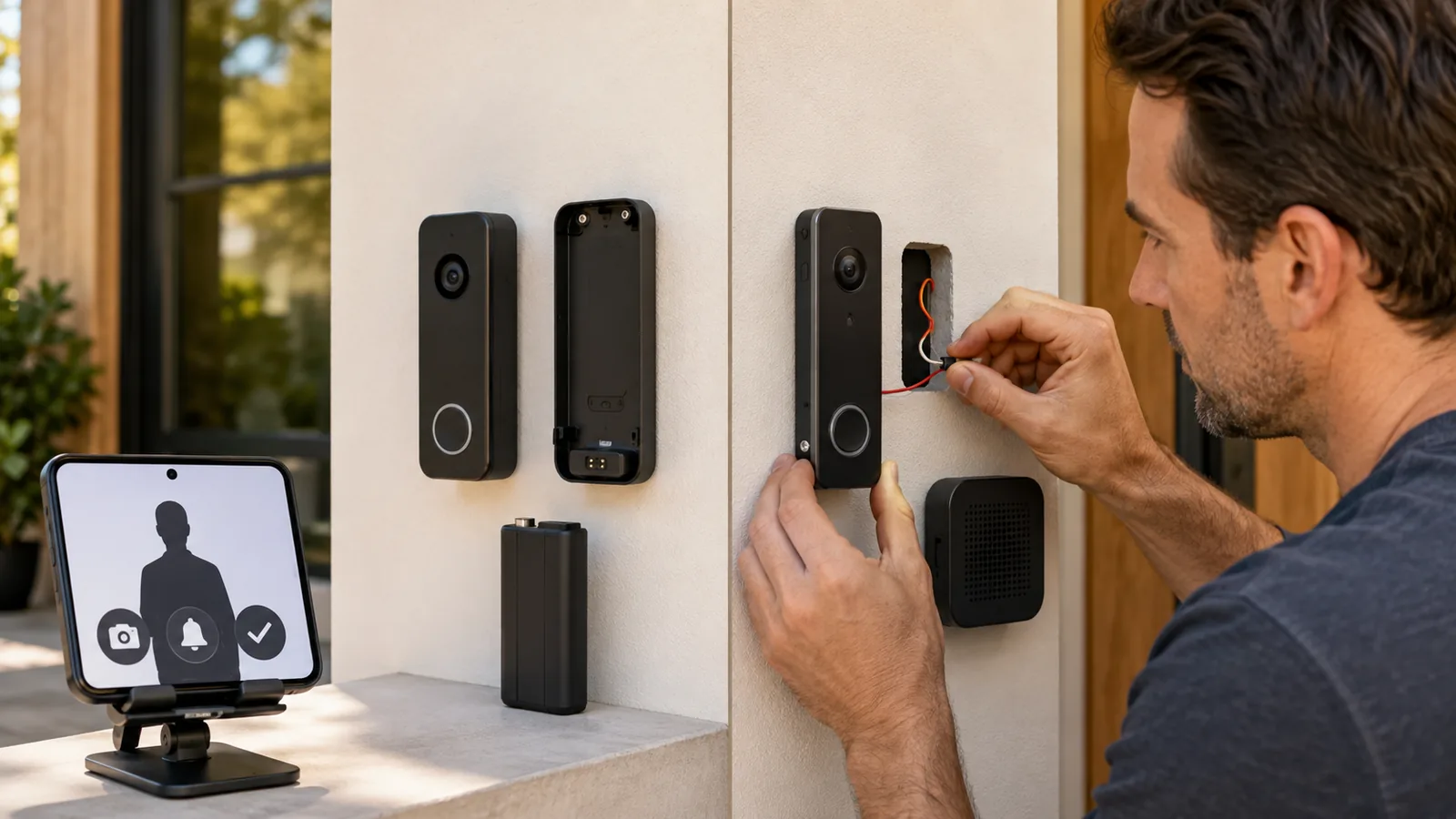
- Mount the bracket. Most battery doorbells include a mounting plate. Use a screwdriver to attach it to your door frame or wall. For wood frames, short screws suffice; for masonry walls, pre‑drill holes and use the provided anchors.
- Attach the doorbell. Slide or snap the doorbell onto the bracket. Follow the manufacturer’s instructions to secure it (many use a small set screw). Connect to your Wi‑Fi network using the app and test live view and notifications.
- Manage batteries. Recharge or swap batteries as needed. Some models support solar panels to trickle‑charge the battery. In cold weather, check battery life more frequently.
Installing a Wired Doorbell
Safety first: Turn off power at the circuit breaker. Test by pressing the existing doorbell – if it doesn’t ring, you’ve shut off power.
- Remove the existing doorbell. Unscrew the old doorbell button and gently pull it away from the wall. Disconnect the wires and note which wire attaches to which terminal.
- Prepare the new doorbell. If using a PoE model, run an Ethernet cable from your router or PoE switch to the doorbell location. For low‑voltage models, ensure your transformer supplies the correct voltage (often 16 – 24 V AC).
- Connect the wires. Attach the existing wires to the new doorbell’s terminals according to the manufacturer’s diagram. Secure them with screws. If the doorbell supports a chime kit, connect the jumper wires as instructed.
- Mount the doorbell. Screw the mounting plate to the wall. Feed wires through the back and ensure the plate is level. Snap the doorbell unit onto the plate.
- Restore power and test. Turn the breaker back on. The doorbell should light up. Use the app to connect the doorbell to Wi‑Fi (if required) and test the chime, video and two‑way audio. If your doorbell supports cellular backup, ensure the SIM is activated.
Tips for renters and homeowners
Security.org notes that homeowners often replace existing doorbells with minimal concerns about damage, whereas renters should avoid modifying wiring to protect their security deposit. Renters can choose battery‑powered models or peephole cameras that don’t require drilling. Always check building rules before drilling into a doorframe or wall.
Additional Features and Integration
Modern video doorbells offer far more than a simple bell and camera. Here are some features to consider:
- AI‑driven motion detection – People, package and vehicle detection reduce false alerts. Top models, such as Eufy and Arlo, provide on‑device AI so footage doesn’t leave your home, enhancing privacy.
- Dual cameras and 3D radar – High‑end doorbells include top‑down package cameras (e.g., Eufy E340) or radar sensors to create more accurate motion zones.
- Local vs cloud storage – Battery models like Eufy store video locally on a base station or micro‑SD card, eliminating subscription fees. Wired models like PoE units may include built‑in storage or rely on network video recorders.
- Smart‑home interoperability – Ensure the doorbell works with your ecosystem (Alexa, Google Home, Apple HomeKit). Some models support Matter, enabling cross‑platform automation. Others integrate with IFTTT to trigger lights or alarms when motion is detected.
- Advanced night vision – Infrared LEDs provide clear black‑and‑white footage, while built‑in spotlights can deliver colour night vision.
- Pre‑roll recording – Wired models with continuous power can record a few seconds before motion is detected, capturing an approaching visitor’s face even if they don’t press the button.
Frequently Asked Questions (FAQ)
Are wired video doorbells more reliable than battery models?
Yes. Wired doorbells receive constant power from the home’s electrical wiring, so they never need recharging and are less susceptible to interference. In contrast, wireless doorbells rely on battery power and a Wi-Fi signal; they can stop working when the battery is low or when the Wi-Fi connection is weak. However, some battery models offer solar charging or removable batteries to mitigate downtime.
Do battery-powered doorbells work during a power outage?
Yes. Because they run on internal batteries, wireless doorbells continue operating even when household power is lost. That’s a key advantage over wired models, which stop working unless they include battery or cellular backup.
Do wireless video doorbells require Wi-Fi?
Most modern wireless doorbells use Wi-Fi to send notifications and stream video. Reolink notes that these doorbells connect to your home’s Wi-Fi network for networking and remote access. A few models operate on radio frequencies without Wi-Fi, but they typically lack smart features. Ensure your front door has a strong Wi-Fi signal or consider a wired or PoE model if connectivity is weak.
Do video doorbells record continuously?
Usually not. Video doorbells typically record clips when motion is detected or when the doorbell is pressed. Continuous recording is available on some wired models (often with a paid subscription) but requires ample power and storage. If continuous recording is important, choose a wired model with local storage or a plan that supports 24/7 video.
How long do batteries in a wireless doorbell last?
Battery life varies widely based on usage, motion activity and temperature. The Guardian notes that manufacturers estimate between one and six months of battery life, but heavy motion, frequent live viewing or cold weather can shorten it. Models with removable batteries or solar panels can reduce downtime.
Do I need a subscription for my video doorbell?
Not always. Many doorbells offer free basic functionality but charge for cloud storage or AI features. Subscriptions typically cost US$3–10 per month. If you want to avoid fees, choose a model with local storage, such as Eufy or Arlo.
Are video doorbells worth it?
For most homeowners and renters, yes. Video doorbells deter porch pirates and provide evidence in case of theft. They allow you to answer the door from anywhere and may even qualify you for homeowners’ insurance discounts. With the market predicted to grow significantly and both wired and wireless options offering robust features, investing in a quality video doorbell is a practical way to enhance security and convenience.
Conclusion
Video doorbells have matured from niche gadgets into essential smart‑home security tools. The global market is booming, with analysts projecting nearly US$9 billion in sales by 2035. When choosing between battery‑powered and wired models, consider your living situation, Wi‑Fi strength, desired features and budget. Battery models offer quick installation and flexibility – ideal for renters or those without existing wiring. Wired doorbells deliver reliable, continuous power and often support advanced features like 24/7 recording and integration with existing chimes, making them perfect for homeowners.
As you upgrade your front door, remember to look beyond the doorbell. Smart‑home gadgets can enhance convenience and safety across your home. Check out FrediTech’s guides on Best Smart Plugs in 2026 for automating appliances or How to Install LED Light Strips Like a Pro for DIY lighting projects. Investing in the right video doorbell today will keep you connected, protect your packages and give you peace of mind for years to come.
Author: Wiredu Fred – Tech writer and smart‑home enthusiast at FrediTech. Wiredu researches emerging gadgets and smart‑home technology, translating complex specs into easy‑to‑understand guides.