
Introduction
The 10th‑generation Toyota Corolla (2009‑2013) is one of the world’s most popular cars because it offers reliability, good fuel economy and a stress‑free ownership experiencecrutchfield.com. Reviewers describe the car’s ride as comfortable with simple controls, good fuel economy and a quiet cabinedmunds.com. Consumer‑advocacy site CoPilot notes that most 2010‑2013 models have perfect reliability ratings (5 out of 5) and only the 2009 model scored slightly lowercopilotsearch.com. Despite its dependability, the factory audio system in these Corollas is modest—a single‑CD AM/FM unit with MP3/WMA playback and four speakers on base models. Later years offered a few upgrades such as an optional eight‑speaker JBL stereo and touchscreen navigation, but even those now feel datedcrutchfield.com.
In today’s connected world, drivers expect more than basic radio. Android car stereos deliver smartphone‑grade functionality, integrating navigation, wireless communication, voice assistants and streaming into a single head unitpodofo.com. The Leadfan 9‑inch Android 12 stereo is designed specifically for the 2009‑2013 Corolla and includes modern features like wireless CarPlay, Android Auto, GPS, Wi‑Fi 6 and a large IPS touchscreen. This guide explains why upgrading makes sense, reviews key features of the Leadfan unit, walks through installation, and answers frequently asked questions. Throughout the article you’ll find links to other Freditech posts and expert sources for deeper reading.

{getToc} $title={Table of Contents} $count={Boolean} $expanded={Boolean}
Why upgrade the Corolla’s stock stereo?
A solid car with an aging infotainment system
Toyota’s 10th‑gen Corolla sells on reliability and practicality. In Crutchfield’s research garage, writers praise its ability to “start every morning, go where it’s pointed and not add drama to your busy day”crutchfield.com. The base audio unit in these Corollas, however, is a simple AM/FM receiver with a CD player, aux input and four speakers; mid‑range trims add two speakers, and the premium JBL system includes eight speakerscrutchfield.com. While functional, the factory radio lacks built‑in navigation, smartphone integration, a large touch display or wireless connectivity. Replacing the original head unit will not only modernize your dashboard but also improve sound quality and functionality.
Benefits of a modern head unit
Modern Android car stereos run the same operating system used in smartphones. According to Podofo, Android head units integrate Bluetooth, steering wheel control (SWC), Z‑link, online/offline maps and Wi‑Fi into one devicepodofo.com. Wireless CarPlay and Android Auto allow you to mirror your smartphone on the in‑dash display, access navigation and music apps, send messages via voice and stay hands‑free while driving. They also offer strong Bluetooth and Wi‑Fi connectivity for streaming and calling, built‑in GPS navigation with offline maps, and ample RAM/ROM to download appspodofo.com. Upgrading to a unit like the Leadfan not only modernizes your audio system but increases resale value and enhances safety through better voice control and reversing camera support.
Overview of the Toyota Corolla (2009‑2013)
Before exploring the new stereo, it’s helpful to understand the car you’ll be upgrading.
Reliability and performance
Consumer‑reports aggregated by CoPilot show that the 2009‑2013 Corolla received full recommendations from Consumer Reports, with 2010‑2013 models achieving perfect 5/5 reliability scorescopilotsearch.com. The 2009 model scored slightly lower and is known for issues like excessive oil consumption, but later years improved greatly with the addition of stability control and minor styling updates. Kelley Blue Book (KBB) notes that the Corolla’s strengths include “millions of trouble‑free miles” and a resale record that makes competitors envious. The 2011 Corolla is powered by a 1.8‑liter four‑cylinder engine producing 132 hp; it delivers an EPA‑rated 26/34 mpg (city/highway) with the automatic transmissionkbb.com.
Interior and factory audio
The Corolla’s cabin is comfortable and well insulatededmunds.com, but the factory radio lacks modern conveniences. Crutchfield explains that replacing the factory unit is straightforward: the Corolla accepts single or double DIN receivers and removal involves prying trim panels, unscrewing four 10 mm screws and unplugging the harness. Upgrading the head unit can improve sound quality even if you keep stock speakers, and new stereos often maintain steering wheel controls with the right adaptercrutchfield.com.
Understanding Android car stereos
What is an Android car stereo?
An Android car stereo is essentially a smartphone embedded in your dashboard. Podofo describes it as an upgraded head unit running Android OS, offering advanced functions such as Bluetooth, steering wheel control (SWC), Z‑link, online/offline navigation and Wi‑Fi connectivitypodofo.com. Unlike universal stereos that provide limited radio or CD functionality, Android units enable app downloads, web browsing, streaming services and voice assistants.
Key features of Android head units
The following features make Android stereos appealing for modern drivers:
- Smartphone integration – Wireless CarPlay and Android Auto allow you to mirror your phone, use navigation apps, stream music and answer calls without touching your handsetpodofo.com. Voice control reduces distraction and improves safety.
- Bluetooth & Wi‑Fi – Strong Bluetooth lets you pair your phone for hands‑free calls and music streamingpodofo.com. Built‑in Wi‑Fi modules allow the stereo to connect to a hotspot so passengers can browse the internet or stream video.
- GPS navigation – Many units integrate a GPS module and support offline maps. Even without a data connection, you can download maps to the stereo for turn‑by‑turn directions.
- Large memory and storage – Configurations like 2 GB RAM + 32 GB ROM or 4 GB RAM + 64 GB ROM provide space for apps, music and navigation data.
- HD displays – Common head units use 7‑ to 10‑inch IPS screens with sharp resolution and vivid colorspodofo.com. The generous screen size makes it easier to read maps and control apps at a glance.
These capabilities transform your car into a connected infotainment hub. In the next section we’ll examine how the Leadfan stereo brings them to the Corolla.
Leadfan 9‑Inch Android 12 Stereo for Toyota Corolla (2009‑2013)
Why choose Leadfan?
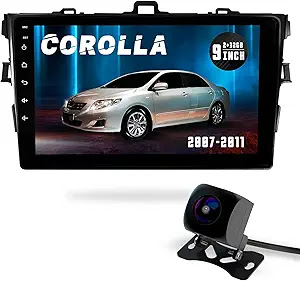
Leadfan is a brand known for producing vehicle‑specific Android head units. The company’s 9‑inch Android 12 stereo is designed to fit Corolla dashboards from 2009–2013. Because this unit has car‑specific mounting and harnesses, installation is largely plug‑and‑play—no cutting or splicing is required. The seller notes that the system supports both wired and wireless CarPlay & Android Auto and features built‑in Wi‑Fi 6 for faster and more stable connectivity. Key features include:
- Android 12 OS – The latest Android version provides a clean user interface with voice search, Google Assistant and compatibility with apps from the Play Store.
- Large IPS display – A 9‑inch HD touchscreen integrates seamlessly into the Corolla’s center stack. The IPS panel offers wide viewing angles and good sunlight readability, making maps and media easier to see.
- Wireless CarPlay & Android Auto – According to the seller’s description, the unit can pair with your smartphone via Wi‑Fi or USB, enabling hands‑free calls, messaging and navigation. CarPlay and Android Auto are the industry standards for in‑car connectivity.
- Built‑in GPS & offline navigation – The radio includes a GPS module. You can download maps or use apps like Google Maps or Waze for real‑time traffic and route planning.
- Wi‑Fi 6 and Bluetooth 5.4 – Dual‑band Wi‑Fi (5 GHz + 2.5 GHz) allows faster web browsing and streaming. Bluetooth 5.4 supports stable connections for phones and accessories.
- MirrorLink / Screen Mirroring – Mirror your smartphone screen to the stereo. This feature is helpful for apps not supported natively through CarPlay or Android Auto.
- FM radio and multimedia support – Listen to your favorite radio stations or play music and video files from USB drives or microSD cards. The system supports common audio formats and includes an equalizer.
- Steering wheel control (SWC) compatibility – The head unit can integrate with the Corolla’s factory steering wheel buttons, allowing you to adjust volume or change tracks without taking your hands off the wheelcrutchfield.com.
- Backup camera support – A 1080p or 720p rear‑view camera can be paired with the stereo to provide clear visuals when reversing. The seller notes compatibility with both AHD (high‑definition) and standard cameras.
- Warranty and after‑sales service – The product description highlights a 12‑month quality assurance period with 24 professional after‑sales support.
These specifications make the Leadfan head unit a complete modern upgrade for older Corollas.
Real‑world example: stock vs. upgraded audio
Imagine owning a 2011 Corolla with the base radio. You can play CDs and maybe connect via an aux cable, but there’s no navigation, voice assistant or wireless streaming. After upgrading to the Leadfan unit you could:
- Navigate hands‑free using Google Maps or Waze on a bright 9‑inch screen.
- Stream Spotify or Apple Music over Wi‑Fi and control playback with steering wheel buttons.
- Mirror your phone display to access apps not available through CarPlay.
- View a live rear‑camera feed for safer parking.
- Receive firmware updates over Wi‑Fi, ensuring features stay current.
The difference is like replacing an old flip phone with a modern smartphone.
Step‑by‑step installation guide
Installing a new head unit may seem daunting, but with the right tools and instructions you can do it yourself. Freditech’s step‑by‑step guide outlines the process clearlyfreditech.com. Below is an adapted version specifically for the Corolla. Consult both this guide and the Leadfan manual for details.
Tools and materials
- Leadfan Android 12 head unit
- Wiring harness adapter (often included)
- Mounting kit (if required)
- Panel removal tool
- Phillips and flathead screwdrivers
- Socket wrench set
- Electrical tape or crimp connectors
- Crimping tool (if custom wiring is needed)
- Antenna adapter (if the factory plug differs)
- User manuals for the Corolla and head unit
1. Disconnect the battery
Safety is critical: disconnect the negative terminal of the car battery to eliminate power while workingfreditech.com. Use a wrench to loosen the nut, remove the cable and set it aside.
2. Remove the factory radio
- Remove trim panels – In the Corolla, start at the seam below the radio and above the HVAC controls. Pry the lower trim panel straight out, remove the side strips, then gently pull the upper vent assembly toward the rear of the carcrutchfield.com.
- Unscrew the radio – Remove the four 10 mm screws securing the factory radio.
- Unplug the harness – Pull the radio out, disconnect the wiring harness and antenna, and set the old radio aside.
3. Prepare the wiring
Most aftermarket stereos ship with a wiring harness that plugs directly into your car’s harness. If not, connect each wire using crimp connectors or soldering. Freditech’s guide suggests matching color‑coded wires (yellow to yellow for power, red to ignition, black to ground) and securing them with tape or connectorsfreditech.com. Connect the antenna adapter if requiredfreditech.com.
4. Install the new stereo
- Test connections – Before securing the unit, connect the wiring harness to the new stereo and temporarily reconnect the battery. Turn on the unit to verify that the display, radio, Bluetooth and speakers workfreditech.com. If everything functions properly, disconnect the battery again.
- Mount the head unit – Slide the stereo into the dash using the provided bracket or the Corolla’s original bracket. Secure it with the screws you removed earlierfreditech.com.
- Attach the backup camera (optional) – Run the camera cable to the back of the car, mount the camera near the license plate, and connect it to the head unit’s video input. Ensure it’s waterproof and angled correctly.
5. Reassemble the dash and test
Reattach the trim panels and reconnect the battery. Turn on the new stereo and test all functions: radio reception, Bluetooth pairing, CarPlay/Android Auto connection, navigation, steering wheel controls and the backup camera. If something doesn’t work, double‑check wiring connections and consult the manual.
Professional installation vs. DIY
If you’re uncomfortable working with vehicle electronics or drilling holes for the backup camera, consider professional installation. Crutchfield notes that patience is critical when dealing with plastic clips and wiringcrutchfield.com, and that you must reconnect airbag wiring harnesses before turning on the ignition to avoid triggering the airbag lightcrutchfield.com. Many audio shops offer installation packages, but doing it yourself can save money and let you learn about your vehicle.
Benefits of upgrading to the Leadfan head unit
Upgrading your Corolla’s audio system yields several practical benefits:
- Enhanced convenience – Wireless CarPlay and Android Auto provide instant access to maps, music and messages. Voice assistants let you issue commands without taking your hands off the wheel, minimizing distractionpodofo.com.
- Better audio quality – Aftermarket head units often have more powerful internal amplifiers and equalizers. Even with factory speakers, you’ll notice improved clarity and stronger bass. Pairing the Leadfan stereo with component speakers or a subwoofer can further elevate your sound.
- Navigation and connectivity – Built‑in GPS and Wi‑Fi mean you can navigate offline and stay connected. 5G‑capable Wi‑Fi 6 ensures smoother streaming and faster downloads.
- Safety features – A reversing camera reduces blind spots and makes parking easier. Voice control and SWC integration keep your focus on the road.crutchfield.com.
- Increased resale value – Buyers value modern infotainment; upgrading can make your older Corolla more appealing when it’s time to sell.
- Future‑proofing – Android 12 receives updates and supports a wide range of apps. With regular updates from the manufacturer, your head unit remains current for years.
Where to buy and ensuring compatibility
The Leadfan 9‑inch Android 12 stereo can be purchased from various online retailers. When buying, make sure the product listing specifically states compatibility with Toyota Corolla 2009–2013 and check whether your car has special factory features such as a built‑in amplifier or clock display above the air vents; such differences may require additional adapters. Look for sellers offering a warranty and after‑sales support (Leadfan advertises a 12‑month warranty).
Freditech recommends reading genuine customer reviews and verifying that the unit supports your desired functions (wireless CarPlay/Android Auto, GPS, Wi‑Fi 6, etc.). For the latest deals, you can visit the Best Car Audio Systems of 2025 post on Freditech for recommendations and price comparisons. When purchasing, select the appropriate wiring harness and installation kit for your Corolla to simplify installation.
- Affiliate disclosure: FrediTech may earn a commission from qualifying purchases at no extra cost to you. Amazon: One of the most reliable platforms for purchasing car stereos with detailed product reviews and seller ratings.
- AliExpress: Offers competitive prices and a variety of sellers to choose from.
- Leadfan Official Website: Purchase directly from the manufacturer for authentic products and potential discounts.
- Walmart: Offers both online and in-store options with customer service support.
Maintaining and optimizing your new stereo
- Keep firmware up to date – Manufacturers periodically release software updates to improve stability or add features. Connect your head unit to Wi‑Fi and check for updates.
- Use high‑quality accessories – Use certified USB cables and microSD cards to avoid connectivity issues. When installing a backup camera, choose a weather‑proof model with night vision for clear images.
- Organize apps – Install only the apps you need to reduce clutter and improve performance. Avoid sideloading unverified apps that may compromise security.
- Monitor battery voltage – Android head units draw power when the car is on; ensure your car battery is healthy. If you notice slow crank or dim lights after installation, consider upgrading to a higher‑capacity battery or wiring the head unit to an ignition‑switched power source.
- Adjust audio settings – Use the built‑in equalizer to tailor the sound to your preferences. Many units offer presets for pop, rock and classical music.
Frequently asked questions
Is the Leadfan Android 12 stereo compatible with all Corolla trims?
The 9‑inch Leadfan unit is designed for Toyota Corolla model years 2009–2013. It fits most trim levels (Base, LE, S, XLE) because Toyota used the same dashboard openings across the generation. However, models equipped with the premium JBL system or with a separate clock screen above the vents may require additional adapters. Always confirm compatibility with the seller before purchasing.
Will I lose steering wheel audio controls?
No—aftermarket stereos can retain steering wheel controls with the correct wiring adapter. Crutchfield notes that retaining factory controls is reasonably easy and many adapters are availablecrutchfield.com. Make sure to purchase a steering wheel control adapter compatible with both the Corolla and the Leadfan head unit.
Does installing a new stereo void my warranty or affect safety systems?
Generally, replacing a stereo does not void a vehicle warranty, but improper installation could affect electrical components. Always disconnect the battery before workingfreditech.com. Pay special attention to airbag wiring; Crutchfield warns that failing to reconnect airbag harnesses before testing the new unit will trigger the airbag light and require a dealer resetcrutchfield.com.
Do I need to modify the dashboard?
No modifications are typically necessary. The Leadfan unit is designed to fit directly into the Corolla’s dash opening and attaches using the factory mounting points. Always test‑fit the head unit before final installation to ensure proper alignment.
Can I install the stereo myself?
Yes—many owners successfully install aftermarket head units at home. Freditech’s installation guide covers everything from disconnecting the battery to mounting the new stereofreditech.com. If you’re not comfortable working with vehicle electronics or drilling holes for the backup camera, a professional installer can perform the job for a fee.
What if my Corolla still has a cassette or CD player?
The factory audio variations across 2009‑2013 Corollas include single‑CD units and premium JBL stereos. All can be replaced with single‑ or double‑DIN aftermarket receiverscrutchfield.com. If your car has a cassette player or you’d like to retain physical media, consider an aftermarket unit with a CD/DVD drive or USB support.
How does the Leadfan compare to universal head units?
Universal head units are designed to fit many vehicles and often require separate dash kits and wiring customization. The Leadfan unit is engineered specifically for 2009–2013 Toyota Corollas, which simplifies installation and improves factory-style fit. It also includes modern features such as Wi-Fi 6, wireless Apple CarPlay and Android Auto, built-in GPS navigation, and steering wheel control support that may be missing from lower-cost universal units.
Does the stereo come with a backup camera?
Many sellers bundle the Leadfan Android stereo with a backup camera, but this varies by listing. Always check the product description to confirm what’s included. During installation, route the camera cable carefully to avoid interfering with trunk hinges or wiring, and position the camera to provide a clear, unobstructed rear view.
Conclusion
The Toyota Corolla (2009‑2013) remains a practical and reliable carcrutchfield.com, but its factory audio system shows its age. Upgrading to the Leadfan 9‑inch Android 12 stereo transforms your driving experience by adding wireless CarPlay/Android Auto, built‑in navigation, Wi‑Fi 6, Bluetooth 5.4, screen mirroring and backup camera support. With proper installation—either DIY using Freditech’s step‑by‑step car stereo guide or through a professional—you can modernize your Corolla’s dashboard without cutting wires. The improved convenience, safety and resale value make this upgrade a worthwhile investment.
For more on car audio and other smart car accessories, check out Freditech’s related posts:
- Best Car Audio Systems of 2025: Enhancing Your Driving Experience – a review of top head units and speakers.
- 2025’s Ultimate Phone Holder for Your Car – keep your phone secure and accessible on the road.
- Headlight Assembly Replacement for 2009–2010 Corolla – another useful upgrade for Corolla owners.
By following this guide and choosing the right equipment, you’ll enjoy a state‑of‑the‑art infotainment system that brings your beloved Corolla into the modern era.
Author credentials
Wiredu Fred is a technology writer and editor at Freditech. He has years of experience covering consumer electronics, smart car gadgets and automotive tech. His detailed guides help readers make informed decisions about upgrades and installations while adhering to the latest search‑quality guidelines. Fred enjoys translating complex tech into clear, actionable advice and has authored numerous high‑performing posts on Freditech and other tech blogs.
Discover the Latest Deals on Amazon
.webp)


Customer Reviews and Ratings
The Leadfan 9-Inch Android 12 Stereo has received glowing reviews for its ease of use, affordability, and rich feature set. Users praise its seamless installation process, responsive touchscreen, and reliable CarPlay/Android Auto performance. Some reviewers recommend professional installation for those unfamiliar with car audio systems, but most agree it’s a worthwhile upgrade.
Shop Now and Save Big! on AliExpress