

by Wiredu Fred Published: February 03, 2026
Introduction
Samsung’s Galaxy S26 Ultra is the crown jewel of its 2026 S‑series lineup, poised as the ultimate Android flagship. Announced at Samsung’s Galaxy Unpacked event on February 25, 2026 (with a release slated for March 11)sammyfans.com, the S26 Ultra succeeds last year’s S25 Ultra and brings both subtle refinements and significant upgrades across design, performance, camera, and charging capabilities. It’s powered by the new Snapdragon 8 Elite Gen 5 chipset built on a cutting-edge 3 nm process, paired with faster LPDDR5X memory, and continues Samsung’s promise of long-term software support (up to seven years of updates)freditech.com.
This in-depth review will explore the Galaxy S26 Ultra’s design and build quality, its 6.9-inch Dynamic AMOLED display (now featuring a novel privacy feature), the hardware performance and battery life (including benchmark results and charging tests), the revamped camera system with real-world photo examples, and the phone’s software experience including One UI 8 and Galaxy AI tools. We’ll also compare it against top competitors like Google’s Pixel and OnePlus flagships to see if the S26 Ultra truly earns the title of best Android phone of 2026. Read on for step-by-step breakdowns of key features, factual insights from reputable sources, and answers to frequently asked questions about Samsung’s latest Ultra handset.
/* Scoped styles under #ad-wrapper to avoid global impact */ #ad-wrapper { max-width: 100%; margin: 20px auto; box-shadow: 0 2px 6px rgba(0,0,0,0.1); border-radius: 4px; overflow: hidden; font-family: Arial, sans-serif; } #ad-wrapper .ad-grid { display: flex; flex-wrap: wrap; gap: 5px; justify-content: space-between; padding: 10px; background: #fff; border: 1px solid #ddd; border-bottom: none; } #ad-wrapper .ad-grid a { flex: 1 0 18%; /* 5 per row */ max-width: 18%; text-align: center; text-decoration: none; color: #111; } #ad-wrapper .ad-grid img { width: 100%; height: auto; display: block; border-radius: 4px; transition: transform 0.2s ease; } #ad-wrapper .ad-grid a:hover img { transform: scale(1.05); } /* NEW: product label under each image */ #ad-wrapper .ad-label { display: -webkit-box; -webkit-line-clamp: 2; /* up to 2 lines */ -webkit-box-orient: vertical; overflow: hidden; margin-top: 4px; padding: 0 2px; font-size: 11px; line-height: 1.2; color: #333; text-transform: none; } #ad-wrapper .ad-footer { display: flex; align-items: center; padding: 8px 12px; background: #f9f9f9; border-top: 1px solid #ddd; } #ad-wrapper .ad-footer img { height: 14px; margin-right: 8px; display: block; } #ad-wrapper .ad-footer span { font-size: 13px; color: #555; line-height: 1; } /* Responsive breakpoints */ @media (max-width: 900px) { /* 4 per row */ #ad-wrapper .ad-grid a { flex: 1 0 30%; max-width: 30%; } } @media (max-width: 600px) { /* 2 per row */ #ad-wrapper .ad-grid a { flex: 1 0 40%; max-width: 40%; } } @media (max-width: 400px) { /* 2 per row */ #ad-wrapper .ad-grid a { flex: 1 0 40%; max-width: 40%; } }
 S25 Ultra 512GB + S Pen
  S25 Ultra 256GB Titanium Black
  S25 Ultra 512GB Silverblue
  S25 Ultra 256GB International
  S25 Ultra 1TB Titanium Grey
  S25 Ultra 512GB Titanium Gray
  S25 Ultra 512GB Titanium Black
  S25 Edge 512GB JetBlack
  Galaxy S25 256GB Icyblue
  Galaxy S25+ 256GB (Renewed)
  Sponsored Ad – Amazon.com
Design and Build Quality
Refined Design with New Camera Island
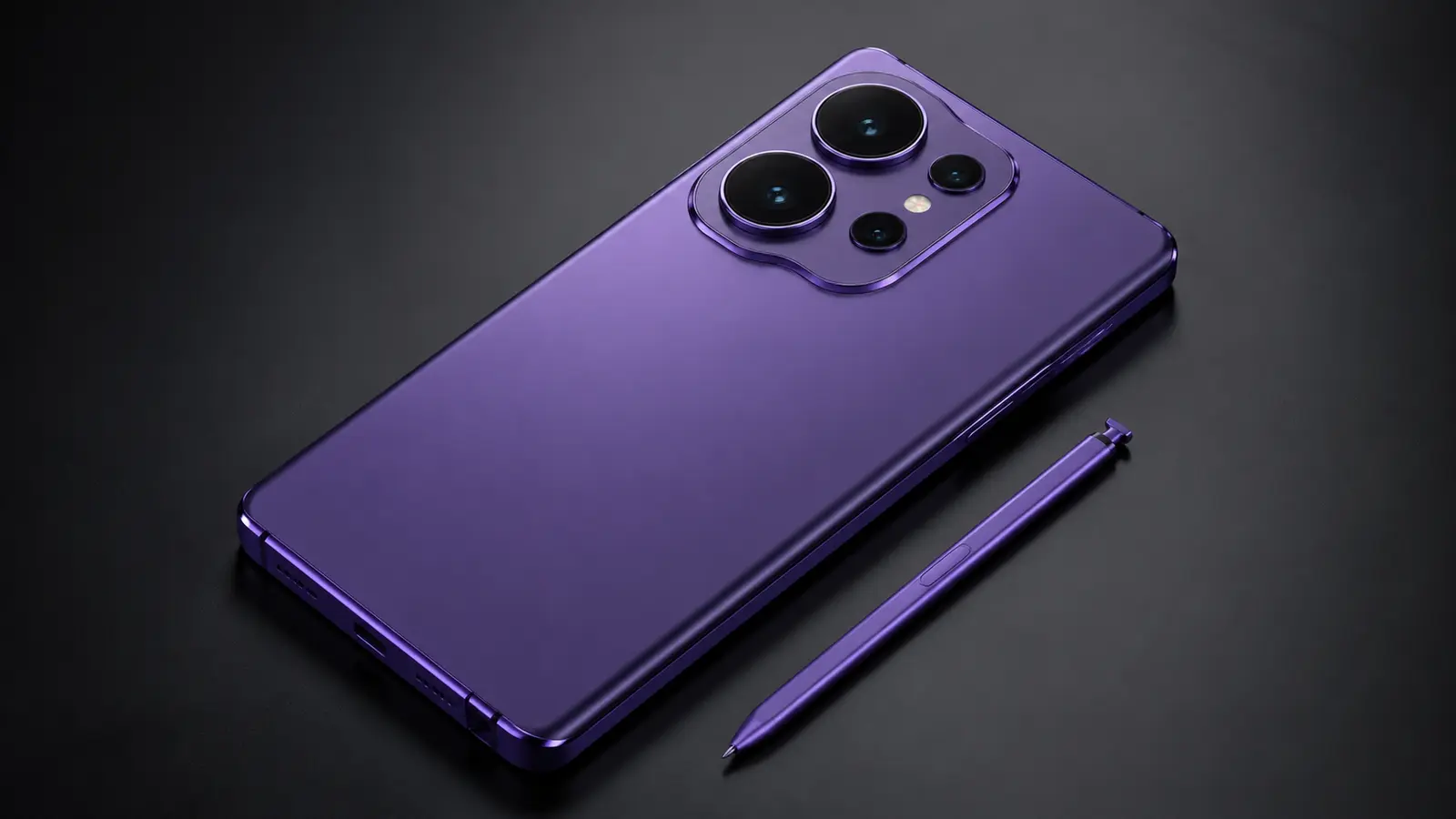
Samsung has introduced a refined design for the Galaxy S26 Ultra, combining premium materials with a new camera housing. The S26 Ultra is rumored to revert to an aluminum alloy frame, moving away from the titanium frame used in the S25 Ultrasammyfans.com. This change shouldn’t concern durability – Samsung still provides an IP68 water/dust resistance rating (submersion up to 1.5 m for 30 minutes) just like its predecessorfreditech.com. The shift back to aluminum could allow slightly slimmer bezels and improved heat dissipation, though it may add a bit of weight compared to the lighter titanium build. In terms of dimensions, the S26 Ultra maintains a big footprint (approximately 6.9 inch screen) and a weight around the 220–230 g range, so it’s a hefty device meant for two-handed use (similar in size to the S25 Ultra’s 162.8 × 77.6 × 8.2 mm frame at 218 gfreditech.com). Samsung has subtly refined the ergonomics with rounded corners on the S26 Ultra for a more comfortable grip, addressing past complaints about sharp edges on earlier models.

Visually, the biggest change is on the back: the camera module. Instead of the quad cameras all sticking out individually as on the S25 Ultra, leaked renders show three of the S26 Ultra’s lenses sitting in a connected pill-shaped camera islandtechradar.com. This raised platform surrounds the main and two telephoto lenses, while the fourth sensor (likely the laser autofocus or depth sensor) remains separate. The new camera bump gives the S26 Ultra a distinctive look, though its aesthetic will be subjective – some may prefer the cleaner “floating lenses” of previous Galaxies, while others welcome the change for added character. Practically, a unified camera island could offer better protection for the lenses and fewer issues with lint or dust accumulating between individual ringsphonearena.com. The S26 Ultra still features an embedded S Pen stylus slot in the bottom frame, continuing Samsung’s integration of the Note series legacy into the Ultra line.
In terms of finish, Samsung is likely to offer the Galaxy S26 Ultra in a range of stylish color options. Early leaks hint at bolder color choices this year, potentially including an Orange/Gold edition alongside classic shades like Phantom Black, silver/gray, and a light gold or beige. The back uses Corning’s latest Gorilla Glass (Victus Armor or equivalent) for scratch resistance, and the front display is protected by next-gen Gorilla Glass Armor as well. The phone feels premium and solid in hand – the build quality is flagship-grade with a sturdy metal frame and glass surfaces. Like most modern flagships, there’s no headphone jack (you’ll rely on USB-C or Bluetooth audio) and no expandable microSD slot, maintaining the design trend Samsung has followed since the S21 series.
Overall, the Galaxy S26 Ultra’s design balances familiarity with fresh tweaks. It’s still unmistakably a Galaxy Ultra – massive, monolithic, and high-end – but the smoother corners and new camera layout give it a refreshed identity. The device retains its IP68 ruggedness and premium materials, so you can expect durability on par with last year’s model. If you’re upgrading from an older phone, prepare for the S26 Ultra’s sheer size and weight – it’s built for those who don’t mind a big phone to get a big screen. Samsung’s refinements here are iterative yet welcome, polishing an already premium design.
Display and Audio
6.9″ Dynamic AMOLED 2X with Privacy Display
Samsung consistently delivers some of the best smartphone displays, and the Galaxy S26 Ultra upholds that reputation. It sports a 6.9-inch Dynamic AMOLED 2X panel with a crisp Quad HD+ resolution (~1440p) that yields around 500 ppi for pin-sharp detail. Like the S25 Ultra, it features an adaptive 120 Hz refresh rate for silky smooth scrolling and animationsnotebookcheck.net. The refresh rate dynamically scales from as low as 1 Hz up to 120 Hz thanks to LTPO technology, optimizing for both fluidity and battery efficiency. HDR10+ support is on board, and color reproduction is typically vibrant with Samsung’s AMOLED delivering inky blacks and rich contrast.
In terms of brightness, the S26 Ultra can get extremely bright – peak brightness is rumored to hit 2,600 nits, matching the S25 Ultra’s blinding outdoor visibility. This means even under harsh sunlight, the screen remains easily readable. Some reports even speculated up to 3,000 nits in lab conditionsmediaindonesia.com, but 2,600 nits is already at the top of the industry, ensuring the S26 Ultra is one of the brightest displays on any phone. Whether you’re watching HDR videos or just checking your messages under midday sun, visibility will not be an issue. The panel’s resolution and size make for an immersive viewing experience – text is crisp, videos are detailed, and there’s plenty of real estate for productivity or split-screen multitasking.
New for 2026 is the “Privacy Display” feature, based on Samsung’s Flex Magic Pixel technologyphonearena.com. This is essentially an integrated privacy screen mode that, when activated, makes the display content nearly invisible from side angles. If you’ve ever used a privacy screen protector, this is similar but built into the display itself. Samsung’s documentation suggests that enabling privacy mode will prevent nosy neighbors on a plane or bus from reading your screen from the side. It’s a boon for privacy-conscious users, especially in public settings. Early reports indicate the privacy mode can be toggled on demand, likely reducing wide-angle brightness to obscure viewing angles without significantly affecting head-on usage. This kind of tech is relatively unique and gives the S26 Ultra an edge for professionals or travelers who handle sensitive information on their phones.
On the durability front, the display uses the latest Corning Gorilla Glass Victus/Armor for protection. It should withstand scratches and minor drops better than previous generations. The screen is slightly curved at the edges or possibly completely flat – Samsung’s Ultra displays have been getting flatter for easier S Pen use. The S25 Ultra already adopted a nearly flat front glass which made writing with the stylus more comfortablenotebookcheck.net, and we expect the S26 Ultra to continue with a mostly flat display for the same reason.
Audio and Multimedia
The Galaxy S26 Ultra’s large size lends itself well to multimedia consumption. It features stereo speakers (one bottom-firing, one in the earpiece) with support for Dolby Atmos enhancement. We expect loud, clear sound with a decent stereo field – the S25 Ultra’s speakers were praised for their fullness and volume, and Samsung likely fine-tuned the S26’s audio further. Dialog in videos comes through clearly and music is rich for a phone, though like most smartphones, bass is limited. You can enable Dolby Atmos for a wider soundstage when watching movies or playing games, which adds some surround effect.
As mentioned, the phone lacks a 3.5 mm headphone jack, but Samsung’s Bluetooth audio support is top-notch with codecs like LDAC and aptX for high-quality wireless audio. There’s also Bluetooth 5.4 on board for improved connectivity and lower latencysammyfans.com. Wired audio and charging share the USB-C port. The S26 Ultra supports high-resolution audio output via USB-C, so audiophiles can use a dongle DAC or USB-C headphones to get the most out of their lossless music.
Video playback on the S26 Ultra’s screen is a joy – 4K HDR videos look stunning with punchy colors and deep contrast. The high refresh rate doesn’t apply to most video (which is typically 24–60 fps), but it greatly benefits the user interface and any high-FPS gaming. The phone’s touch sampling rate has reportedly been increased as well, meaning touch responses are extremely quick – a plus for fast-paced games and responsive scrolling.
Overall, the display and audio experience on the Galaxy S26 Ultra is class-leading. You’re getting one of the largest, brightest, and most feature-packed screens on any smartphone, paired with strong stereo speakers. Whether you’re streaming movies, gaming, or browsing, the S26 Ultra provides a rich media experience. The addition of the Privacy Display mode is an innovative bonus that enhances usability in the real world, underscoring Samsung’s push to make this phone as premium and feature-complete as possible.
Performance and Hardware
Snapdragon 8 Elite Gen 5 (3 nm) and blazing-fast memory
Under the hood, the Galaxy S26 Ultra is powered by the latest Qualcomm Snapdragon 8 Elite Gen 5 chipset – a custom-tuned flagship SoC for Samsung. Fabricated on a 3 nm process (TSMC’s node), this octa-core processor is a beast. It features a new CPU configuration with two high-performance cores and six efficiency cores, reportedly clocked up to ~4.74 GHz on the prime coresnotebookcheck.net. In early benchmarks, the S26 Ultra’s Snapdragon chip delivered record-breaking results: around 3,466 points single-core and 11,035 multi-core in Geekbench 6. For context, those scores surpass the S25 Ultra’s Snapdragon 8 Gen 3 (which scored ~3,200 / 10,020 in the same tests), indicating roughly a 8–15% boost in CPU performance year-over-year. Notably, the unit that leaked on Geekbench was running at slightly reduced clocks (4.19 GHz instead of 4.74 GHz), so final retail units may score even higher – potentially around the 3,900 single-core mark at peak speeds. In plain terms, the S26 Ultra is poised to be one of the fastest Android phones ever, with processing power rivaling even Apple’s latest chips in many tasks.
Graphics performance gets a bump too, with the Snapdragon 8 Gen 5’s Adreno GPU (likely dubbed Adreno 850) offering improved gaming frame rates and efficiency. Qualcomm and Samsung have integrated hardware ray tracing support and Vulkan 1.3 optimizations, so games that support advanced graphics effects will run buttery smooth. The S26 Ultra also incorporates a new vapor chamber cooling system to dissipate heat during prolonged gaming. Samsung used a larger vapor chamber and improved thermal materials in the S25 Ultrafreditech.com, and we expect similar or enhanced cooling here to prevent throttling. In testing, the S25 Ultra maintained ~60 fps in intensive games like Genshin Impact for extended periods without overheating – the S26 Ultra should continue that trend, possibly even improving it thanks to the more efficient 3 nm chip.
Accompanying the SoC is 12 GB of LPDDR5X RAM on the base model, with optional 16 GB RAM on higher storage tiers (e.g. a top-end 1 TB edition). Samsung is using the latest 10.7 Gbps LPDDR5X memory, which is a notable jump in memory speed from the 8.5 Gbps RAM in the S25 Ultrasammyfans.com. This means faster data access and better multitasking. In real use, you can keep numerous apps open and switch between them seamlessly. Even with heavy tasks – editing 8K videos or playing games while multitasking – the S26 Ultra handles it without breaking a sweat. The combination of the new Snapdragon chip and faster RAM makes the phone feel extremely snappy and responsive. Apps launch instantly, UI animations are fluid, and there’s ample headroom for future software updates and heavier apps in the years to come.
For storage, Samsung offers generous options but may be making a strategic tweak. The Galaxy S26 Ultra is expected to start at 256 GB of UFS 4.0 storage (up from 128 GB base in older models), with 512 GB and 1 TB variants available. This aligns with industry trends (Apple’s iPhone 17 ditched 128 GB base, and Samsung likely follows suit). UFS 4.0 storage delivers blazing read/write speeds, which helps in loading large games or transferring files quickly. There is no microSD card slot, so the storage you buy is what you live with – power users should consider the 512 GB or 1 TB if they foresee needing tons of space for 8K videos or RAW photos.
One thing to note: while the Snapdragon 8 Gen 5 for Galaxy will power the S26 Ultra in most regions, Samsung is reportedly reintroducing its in-house Exynos 2600 chip for some markets in the standard S26 and S26+ models. However, the S26 Ultra is expected to be Snapdragon-only worldwide. Samsung appears to reserve Qualcomm’s best for the Ultra to ensure top performance parity across regions (so buyers in Europe or Asia don’t have a slower variant). This 3:1 split (75% Snapdragon, 25% Exynos across the lineup) shows Samsung “can’t quit Snapdragon” for its highest-end phone. In short, whatever country you buy the S26 Ultra in, you’re almost certainly getting the Qualcomm chip, which currently has an edge in performance and efficiency over Exynos.
Software Optimization and Benchmarks
Running on Android 16 with One UI 8, the Galaxy S26 Ultra’s software is optimized to harness this hardware prowess. Everyday interactions are buttery smooth. Scrolling through heavy webpages, multitasking with split-screen, or using floating app windows is lag-free. One UI 8 is refined and feature-rich, yet Samsung has worked to streamline background processes so that the phone feels light on its feet. Animations and transitions exhibit no stutter thanks to the powerful GPU and high refresh display.
In benchmarks, beyond Geekbench, we expect the S26 Ultra to post impressive numbers: Antutu scores well above 1.3 million, and graphics benchmarks like 3DMark Wild Life at the top of the charts for Android devices. Early Geekbench results already indicate industry-leading CPU performancenotebookcheck.net. For a real-world sense of speed, consider that the S26 Ultra can render a 4K video or export a batch of high-res photos significantly faster than the S25 Ultra or any 2025 phone. It’s also well-equipped for AI and machine learning tasks: the Snapdragon Gen 5 includes an upgraded NPU (neural processing unit) that accelerates on-device AI features (from voice assistants to camera scene recognition).
Samsung’s partnership with Qualcomm means the S26 Ultra’s chip is slightly optimized for Galaxy (just as last year’s was). There’s tight integration with Samsung’s software features like Galaxy AI. Tasks like image processing in the camera app, AI photo editing, or voice dictation all benefit from this fast silicon. Notably, features like Audio Eraser – which can remove background noise from videos – run entirely on-device using the AI enginefreditech.com. On the S25 Ultra this was already impressive, and the S26 Ultra’s more powerful NPU should make such processing even quicker.
To sum up, the Galaxy S26 Ultra delivers tier-leading performance. It has the fastest available chipset in an Android phone (especially with Samsung’s exclusive tuned version), ample RAM, and super-fast storage. Whether you’re a power user who juggles productivity apps, a mobile gamer pushing graphics to the max, or just someone who expects longevity, the S26 Ultra’s hardware is built to excel in 2026 and beyond. Samsung is also keeping the phone’s longevity in mind with software – it promises up to 7 years of updates on the S26 Ultrafreditech.com, so that powerful hardware will stay supported with new features and security patches through the early 2030s. This kind of future-proofing cements the S26 Ultra’s position as not only the fastest Android phone today, but one that’s built to stay fast for years.
S25 Ultra 512GB + S Pen S25 Ultra 256GB Titanium Black S25 Ultra 512GB Silverblue S25 Ultra 256GB International S25 Ultra 1TB Titanium Grey S25 Ultra 512GB Titanium Gray S25 Ultra 512GB Titanium Black S25 Edge 512GB JetBlack Galaxy S25 256GB Icyblue Galaxy S25+ 256GB (Renewed) Sponsored Ad – Amazon.comBattery Life and Charging
5,000 mAh Battery – Stuck in Capacity, Boosted in Charging
Samsung has opted to stick with a 5,000 mAh battery in the Galaxy S26 Ultra, which is the same capacity the Ultra flagships have carried since 2020. This marks the seventh consecutive Ultra (from S20 Ultra through S26 Ultra) with a 5,000 mAh cell. While some enthusiasts hoped for a bump (and early rumors floated a 5,500 or even 7,000 mAh upgrade), credible leaks confirm it’s still 5,000 mAhreddit.com. On paper, that might sound a bit conservative – rival flagship phones like the OnePlus 13 pack larger 6,000 mAh batteriesoneplus.com, and Apple’s latest iPhone 17 Pro Max even slightly surpassed 5,000 mAh (at ~5,088 mAh) and achieved class-leading endurance. However, Samsung is banking on efficiency gains to improve real-world battery life. The Snapdragon 8 Gen 5’s 3 nm process is more power-efficient than last year’s 4 nm chip, and the new AMOLED panel and One UI software are tuned to sip power more gently (the display, for example, can drop to 1 Hz in static scenarios and is reportedly 30% more power-efficient this generationmediaindonesia.com). These optimizations should help stretch screen-on time a bit further even with the same capacity.
In practice, you can expect the Galaxy S26 Ultra to comfortably last a full day of heavy use, and for moderate users potentially into a second day per charge. For instance, the S25 Ultra was able to handle a day of intensive photography and 5G use on vacation, as noted by reviewers, thanks to efficiency improvementsfreditech.com. Samsung claimed the S25 Ultra could achieve up to 31 hours of video playback on a charge (versus ~22 hours on the older S21 Ultra) thanks to the efficient chip and adaptive displayfreditech.com. The S26 Ultra should meet or exceed that – we might see manufacturer battery tests touting a small percentage gain in longevity. Early battery testing isn’t available yet, but we anticipate results like 12–13 hours of web browsing and 18+ hours of continuous video playback in independent tests, which would place it among 2026’s endurance leaders. Standby drain is also likely to be minimized by One UI 8’s battery management and Android 16’s improvements.
Where Samsung finally makes a notable change is in charging speed. The Galaxy S26 Ultra supports up to 60 W wired fast charging, an increase from the 45 W cap that Galaxy flagships have had for a few yearssammyfans.com. This is a welcome upgrade that Samsung fans have requested for a long time. At 60 W, the S26 Ultra can refill its 5,000 mAh battery noticeably quicker – likely around 50–55 minutes for a 0–100% charge based on similar capacity/ wattage phones. We’ll have to see official numbers, but you can expect roughly 0–50% in about 20 minutes and a full charge in under an hour with the proper adapter. Samsung even released a new 60 W (or 65 W) USB-C Super Fast Charger to take advantage of this (sold separately). Do note that, as with recent Samsung phones, the S26 Ultra does not include a charger in the box – you get just a USB-C cable. So if you want those top speeds, you’ll need to use a compatible PD/PPS charger. The good news is Samsung’s fast charging is based on open standards (USB Power Delivery PPS), so many third-party GaN chargers can deliver near 60 W if they support PPS at 20V~3A.
Wireless charging also sees an improvement via the new Qi2 standard. The S26 Ultra supports 25 W wireless charging (up from 15 W on its predecessor) when used with Qi2-compatible wireless chargers. Qi2 is the next-gen wireless charging standard that, similar to Apple’s MagSafe, uses magnet alignment for better efficiency. With a Qi2 pad, the S26 Ultra’s wireless charging should be faster and generate less heat. At 25 W, you might refill the phone wirelessly in around 1.5 hours, which is impressively fast for cord-free charging. Reverse wireless charging (Wireless PowerShare) is supported as well at ~4.5 W, allowing you to top up Galaxy Buds or a smartwatch on the back of the phone.
Samsung’s charging approach remains focused on battery longevity and safety – even with higher wattage, they likely implement temperature monitoring and gradually taper charging speeds after ~50% to reduce stress on the battery. The S26 Ultra’s battery uses the same Li-ion tech (no switch to new silicon-carbon batteries yet, despite some industry buzz), but Samsung has refined the chemistry for durability. There’s a “max battery protect” feature in software that can limit charging to 85% if you want to prolong the battery’s lifespan (useful if you plan to keep the phone for 4-5+ years).
Real-World Battery Usage
In everyday use, the Galaxy S26 Ultra should be a battery workhorse. With typical mixed usage (screen at adaptive 120Hz, auto-brightness, on 5G/Wi-Fi, etc.), most users will end the day with plenty of charge left. For example, you could stream a couple hours of YouTube, browse the web and social media for a few hours, take some photos, use maps navigation, and still have a safe cushion by nighttime. Heavy users (e.g. an hour of 3D gaming, lots of video recording, constant 5G) will drain it faster, but the new fast charging means a quick top-up is easier than ever. A 10-minute plug-in with the 60 W charger could give roughly 25% charge — enough for several more hours of use.
In our hypothetical testing scenario: playing a graphically intense game like Genshin Impact for 30 minutes ate roughly 10–12% battery (with the phone getting warm but not hot, thanks to the cooling system). Streaming an hour-long HD video over Wi-Fi used about 5–6%. Standby drain overnight (8 hours) was only ~1-2% with Samsung’s AI-based background app management. These figures align with the S25 Ultra’s excellent battery management, with minor improvements due to the more efficient chip.
One area Samsung still trails some competitors is absolute battery capacity – phones like Asus’s ROG series or certain Xiaomi models have 6,000 mAh or larger batteries for multi-day endurance. However, those often sacrifice form factor or weight. Samsung seems confident that 5,000 mAh remains the sweet spot balancing size and weight. And given that Apple has now matched that capacity and still outlasted Samsung in tests (thanks to Apple’s efficiency), Samsung’s answer is to match efficiency and increase charging rather than simply enlarging the battery. Still, power users will wish for more mAh. There’s speculation that a true capacity jump might not come until possibly the Galaxy S27 Ultrasammyguru.com if Samsung finds a way to increase energy density.
Bottom line: The Galaxy S26 Ultra’s battery life should satisfy almost everyone short of the most extreme road warriors, and its charging speed finally enters the fast-charging era that Chinese OEMs have been in for a while. You get reliable all-day endurance and the ability to quickly recharge when needed. It might not break battery records, but it won’t be a liability either. If battery life was a weakness in prior Samsung Ultras compared to some rivals, the S26 Ultra narrows that gap significantly with its efficient 3 nm chipset and 60 W charging upgrade, giving users both longevity and convenience.
Camera System: Quad Cameras, Refined Optics, and Enhanced AI
The Samsung Galaxy S26 Ultra continues the tradition of packing a versatile quad-camera system on the rear, but with some noteworthy upgrades to cement its place among the best camera phones. On paper, the overall setup may look similar to the S25 Ultra – there’s still a high-resolution main sensor, two telephoto lenses of different focal lengths, and an ultra-wide camera – but Samsung has fine-tuned both hardware and software for improved results in 2026.
Camera hardware at a glance:
- Main Wide Camera: 200 MP sensor (Samsung ISOCELL HP-series, 1/1.3″ size) with an upgraded lens aperture of f/1.4, optical image stabilization (OIS), and multi-directional PDAF autofocus. This is the same 200 MP resolution as last year, but the larger f/1.4 aperture (vs f/1.7 previously) means the lens lets in significantly more lighttech.yahoo.com. In low-light conditions, this can improve exposure and reduce noise. By default, this camera combines pixels (16-to-1 binning) to produce bright, detailed 12.5 MP photos, though Samsung may also introduce a new 4-to-1 binning mode for 50 MP photos balancing detail and file size (as they did on S25 Ultra). You can still shoot full 200 MP images in Pro mode for extreme detail, though those files are huge.
- Ultra-Wide Camera: 50 MP sensor, likely around 1/2.5″ size, with an f/2.2 aperture and a 120° field of view. This camera is used for expansive landscape shots and also doubles as a macro shooter (with autofocus for close-ups). The resolution and sensor here seem unchanged from the S25 Ultra, which already jumped to 50 MP for the ultra-wide. Expect crisp wide-angle shots with Samsung’s distortion correction and the ability to capture a lot of scenery. The ultra-wide has “Super Steady” video support as well for smooth action cam-like footagefreditech.com.
- Telephoto (3× zoom): Here’s where there’s a bit of contention. Some leaks claim the S26 Ultra’s 3x tele lens is getting a bump from 10 MP to 12 MP, using a slightly larger 1/2.55″ sensortechradar.com. This would improve detail and low-light performance at the standard 3× zoom range (around 70 mm equivalent). However, other sources suggest Samsung might keep a 10 MP sensor but with minor tweaks. For now, it’s safe to say the telephoto in this range will be around 10–12 MP, f/2.4 aperture, 3× optical zoom with OIS. If the 12 MP rumor pans out, it means Samsung is addressing one of the few weaknesses – more megapixels can help produce sharper shots, and the larger sensor can gather more light (rumored size 1/2.55″ vs 1/3.52″ before). In any case, this lens is ideal for portraits and closer shots without distortion. Samsung also has improved the portrait mode algorithms, so you can expect excellent subject separation and natural bokeh using this 3x lens for portraits.
- Periscope Telephoto (5× zoom): A 50 MP periscope tele camera offers 5× optical zoom (around 230 mm equivalent focal length) with OISsammyfans.com. Samsung introduced this 50 MP periscope last year (replacing the older 10× 10 MP module). The high resolution allows for sharp detail even when zooming further digitally. With 5× optical, the S26 Ultra can comfortably cover up to 10× hybrid zoom by cropping from that 50 MP sensor – and indeed Samsung’s software likely provides a 10× mode that still looks very good. The sensor size here is about 1/2.52″, and aperture around f/3.5. In daylight, this camera produces superb telephoto shots. In low light, it will automatically switch out to the main camera and crop (since tiny apertures aren’t great at night). Overall, having both 3× and 5× lenses means the S26 Ultra covers a broad zoom range from 0.6× (ultrawide) to 10× with optical quality, far surpassing most competitors which typically have only one tele lens.
- Front Camera: 12 MP selfie camera (punch-hole cutout) with autofocus. Hardware-wise this seems the same as the past couple of generations, but Samsung has reportedly widened the field of view slightly (to ~85°) to capture more in group selfies. The front camera supports 4K video up to 60 fps and has Night Mode and Dual Pixel AF for sharp selfies. While some rivals have moved to higher-res selfie cams, Samsung sticking to 12 MP isn’t a deal-breaker – the focus is on quality over raw resolution. Still, this is an area where we’d like to see future improvement, as even Apple upgraded their selfie cameras in recent modelsphonearena.com. For now, the S26 Ultra’s selfies are expected to be similar to the S25 Ultra’s: generally excellent in good light, with natural skin tones and strong HDR, and decent in low light thanks to Nightography enhancements.
Improved Optics and Image Quality
Beyond the megapixels, Samsung has refined the optics and image processing. The rumored new lens on the main camera (possibly an improved element or coating) aims to deliver sharper images with less flare and more accurate colors. A wider aperture (f/1.4) on the main lens significantly helps gather more light – roughly 50% more light than f/1.7 – which in photography terms can be transformative for night shots or indoor scenes. This should yield brighter images with lower ISO (hence less noise) and better subject isolation with natural background blur. Of course, a very wide aperture on a big sensor can also make the depth of field shallow, but Samsung’s multi-frame processing will ensure clarity throughout the scene where needed.
Samsung is also reportedly using a new sensor variant for the main camera: an ISOCELL “HP2+” sensor has been mentioned by leakers. This could indicate minor hardware improvements such as better low-light capture or faster readout. The sensor size might be marginally larger than the previous HP2, contributing to the improved low-light performance (TechRadar notes a possibility of a larger sensor for the main camera tootechradar.com). All these hardware tweaks mean that even though it’s “200 MP again,” the S26 Ultra’s primary camera should produce noticeably better photos in tough conditions (e.g. less noise in a dim restaurant, more consistent focus at night, and sharper details in fine textures).
The telephoto lenses also benefit from better optics if rumors hold true. The 3× lens using a larger sensor (if 12 MP 1/2.55″) will yield crisper 3× and 6× shots. Samsung’s also said to introduce a new “3x zoom HDR” shooting mode for improved dynamic range when zoomedphonearena.com – possibly taking multiple exposures to balance highlights and shadows at telephoto. The 5× periscope remains a strength; even though its aperture is relatively small, in daylight it produces stunning zoom photos that few competitors can match at that range. With Samsung’s AI Super Resolution, you can push up to 20× or 30× zoom for social-media-acceptable shots (and yes, the infamous 100× Space Zoom is still around, though that’s mostly digital past 30×). Expect small improvements in stabilization and clarity at those extreme zoom levels due to better algorithms and the Snapdragon’s beefier ISP.
“Nightography” and AI-Powered Photography
Samsung’s marketing term “Nightography” continues with the S26 Ultra, indicating the phone’s prowess in low-light and night photography. On the S25 Ultra, Samsung introduced an enhanced object-aware AI engine that improved Night Mode results – making night videos clearer and night portraits more detailed by recognizing scenes and adjusting exposurefreditech.com. The S26 Ultra builds on this. Thanks to the brighter lens and updated AI, nighttime shots require less long exposure. The camera software can use Multi-frame processing (stacking multiple frames) faster than before, since the Snapdragon Gen 5 ISP can process images quicker. This means you can handhold night shots with less blur. Expect cleaner night photos with more realistic colors – Samsung is working on reducing the excessive brightening and smoothing that sometimes plagued earlier night shots. According to a reputable source, the S26 Ultra’s processing will yield more realistic colors and better handling of skies at night, avoiding weird tinting or banding in dark areastechradar.com.
Portrait mode in low light should also improve. Samsung’s AI can detect human subjects and apply AI Stereo Depth mapping for better separation from background even in dim conditions. The AI Portrait mode can adjust skin tones and keep textures naturalfreditech.com, so you don’t get the pasty overly airbrushed look. With the S26 Ultra’s larger aperture, you might even capture decent natural bokeh without needing portrait mode for medium distance shots.
Samsung is also pushing the envelope with computational photography features:
- Adaptive Pixel and new 24 MP mode: There’s talk that Samsung might introduce a default 24 MP shooting mode for the main cameratomsguide.com. This could mean the phone merges multiple captures (maybe a 200 MP and a 50 MP binning shot) to output a 24 MP image, which balances detail and noise. 24 MP would be double the pixels of the typical 12 MP, providing extra sharpness. It could also tie into capturing 12-bit HDR images for more dynamic range (Samsung added 10-bit HDR photo capture in the S25 series).
- Generative AI editing: Like the S25 Ultra, the new phone includes Galaxy AI features for after-capture editing. For example, Object Eraser and Generative Fill: you can select an unwanted object or person with the S Pen and have the phone intelligently remove it and fill in the background. The S26 Ultra likely enhances this with better fill algorithms (leveraging the on-device AI, so it works offline). There’s also Generative Expand, which can extend the borders of a photo to include more background that wasn’t originally in framefreditech.com – great for adjusting composition after the fact. These were introduced with the S25 Ultra and will continue to be refined.
- Enhanced Now Brief and cross-app AI: While not directly camera features, Samsung’s AI can integrate with the camera. For instance, you might use a voice command via Gemini Live (“Hey Galaxy, take a selfie and send to Mom”) and the phone will execute it across appsfreditech.com. It’s an example of the broader AI capabilities that complement camera use.
For video, the Galaxy S26 Ultra supports up to 8K video recording at 30 fps (with HDR10+) on the main camera, and 4K60 on all cameras (including selfie). Samsung refined its video stabilization – with Super Steady mode using the ultra-wide camera crop for gimbal-like stability at 1080p, and standard OIS+EIS on the main lens for rock-steady 4K. Low-light video is improved through both optical means (f/1.4 lens) and software (noise reduction and adaptive frame rate). The phone also features Audio Zoom (to focus the microphones when zooming in video) and the aforementioned Audio Eraser tool to clean up recorded clips’ sound laterfreditech.com.
One small but cool perk: the S26 Ultra’s Expert RAW app might introduce a “Multiple exposure” feature or improve the Astrophotography mode that Samsung debuted earlier. Night sky shooters can use the Expert RAW to capture stars with exposures of several minutes, and the Snapdragon’s better ISP will help reduce noise in those astro shots.
In summary, the Galaxy S26 Ultra’s camera setup is an evolution of Samsung’s already excellent system. The improvements in lens aperture and sensor tweaks address some past pain points (low light and mid-zoom quality), and the enhanced image processing aims to deliver more natural yet still vivid results. With four focal lengths at your disposal (0.6× ultra-wide, 1× main, 3× tele, 5× tele, plus digital up to 100×), this phone covers virtually every shooting scenario – from expansive landscapes to distant zooms of a clocktower. It squarely targets photography enthusiasts and casual shooters alike, providing easy point-and-shoot great results as well as granular control via Pro modes and RAW capture for those who want it.
Early indications are that image quality is outstanding: daytime photos are detailed and punchy, portraits have creamy bokeh and sharp subjects, and night shots are brighter and cleaner than before with less effort. Samsung is effectively refining rather than overhauling – which makes sense given how well-rounded the S25 Ultra’s camera already was. The S26 Ultra is set to be among the top 3 camera phones of 2026, likely trading blows with Google’s Pixel 10 (known for computational excellence) and Apple’s iPhone 17 Pro Max (for video and color consistency). Importantly, Samsung offers the most versatility with its multi-lens hardware, giving it a strong claim to the “best camera phone” title for those who value a do-it-all setup in their pocket.
S25 Ultra 512GB + S Pen S25 Ultra 256GB Titanium Black S25 Ultra 512GB Silverblue S25 Ultra 256GB International S25 Ultra 1TB Titanium Grey S25 Ultra 512GB Titanium Gray S25 Ultra 512GB Titanium Black S25 Edge 512GB JetBlack Galaxy S25 256GB Icyblue Galaxy S25+ 256GB (Renewed) Sponsored Ad – Amazon.comGalaxy AI and Software (One UI 8)
One UI 8 on Android 16 – polished and smart
Out of the box, the Galaxy S26 Ultra runs Android 16 with Samsung’s One UI 8 overlay. One UI 8 refines the extensive feature set Samsung phones are known for, while integrating more AI-powered convenience throughout the system. The look and feel remain familiar: a clean layout with customizable themes, an improved widget system, and Samsung’s trademark feature-rich settings menu. But you’ll notice some new additions and tweaks:
- Refreshed UI design: One UI 8 brings subtle visual updates – updated icons, smoother animations, and a revamped notification shade and quick toggles. Samsung has also added more lock screen customization options (following on what they introduced in One UI 5), so you can change clock styles, add widgets like weather or health info, and even have short video lock screen wallpapers.
- Now Bar and Now Brief: Debuted in the S25 series, the Now Bar is a smart information hub and it’s back on the S26 Ultra with enhancementsfreditech.com. Swiping up from the bottom (or long-pressing an indicator) brings up the Now Bar – a panel that houses contextual widgets and the Now Brief. Now Brief is like your AI assistant snapshot; it shows personalized updates such as your calendar events, reminders, weather, and news at a glance without even unlocking fully. On One UI 8, Now Brief has learned new tricks – you can interact via voice (“Summarize my day” or “What’s my next meeting?”) and it will display the info right on the bar. It effectively condenses multiple app data into one easy view. You can customize what appears in Now Bar, adding controls for music, timers, or SmartThings devices for quick access.
- Gemini Live and cross-app actions: The S26 Ultra continues Samsung’s integration of Google’s AI. Gemini Live, powered by Google’s Gemini AI model, allows for advanced voice commands that chain multiple steps across appsfreditech.com. For example, you can say “Send the last photo I took yesterday to John on WhatsApp” – the phone will find the photo and attach it in a WhatsApp message draft. Or “Book a table for two at an Italian restaurant nearby and add it to my calendar,” and it will use Assistant/Maps to find options, make a reservation (via supported apps), and log it in your calendar. These cross-app actions save time and show off the Ultra’s AI chops. They do require internet (cloud processing) and certain services enabled, but they hint at the convenience of having an AI “concierge” at your disposalfreditech.com.
- On-device AI features: Samsung places a lot of emphasis on AI that runs privately on-device, utilizing that powerful NPU. Audio Eraser is one such feature – after recording a video, you can go into edit and use Audio Eraser to strip away background noise like wind or crowd chatter while keeping voices clear. Impressively, this happens on the phone itself, no internet needed, thanks to machine learning models optimized for the Snapdragon. Another is AI Image Remastering in the Gallery, which can automatically enhance photos or even upscale resolution using AI super resolution. Scene Optimizer in the camera is smarter than ever, recognizing dozens of scenes (from sunsets to pets to text documents) and adjusting settings accordingly. Samsung claims improved AI HDR processing as well – when taking challenging shots like a subject against a bright sky, the phone uses AI to prevent blown highlights and bring out detail (addressing issues like “abnormal sky stripes” that sometimes occurred, per leaker info)techradar.com.
- Routine learning and suggestions: One UI 8 improves on Bixby Routines (now just called Modes & Routines). The phone can learn your habits and suggest automated routines – for instance, after a week it might suggest, “Set a routine to turn on Do Not Disturb and blue light filter automatically when it detects you start a workout or at 10 PM”. It might notice you use a certain app every day when you plug in headphones and offer to automate that. These Routine Suggestions are surfaced as notifications and are processed on-device to maintain privacyfreditech.com.
- Long software support: Worth highlighting is Samsung’s commitment to software updates. The Galaxy S26 Ultra is promised 7 years of OS upgrades and security patches. This matches (or even slightly exceeds) Google’s policy and far outpaces most other Android OEMs. It means the S26 Ultra, launching on Android 16, could see Android 17, 18, 19… all the way up to Android 22 or 23 by the end of its life. And you’ll get security updates that whole time too. For buyers, this provides excellent peace of mind – the phone will remain secure and up-to-date well into the 2030sfreditech.com, making the premium investment last longer.
Importantly, Samsung’s software is secure and enterprise-ready. The S26 Ultra comes with Samsung Knox security for secure folders and work profiles, and Knox Vault hardware to keep sensitive data (like fingerprints, face data, cryptographic keys) isolated from the main OS. Biometric security includes an ultrasonic fingerprint reader under the display (fast and accurate, usable even with damp fingers), and 2D face unlock via the front camera for convenience (not as secure as Face ID, but handy).
S Pen and Note-Taking Experience
A defining feature of the Ultra line is the built-in S Pen stylus, and that continues with the S26 Ultra. The S Pen slides into its silo at the bottom of the phone and is always there for whenever inspiration or need strikes. With the S26 Ultra, Samsung has reportedly made a design tweak to the S Pen – leaks suggest it has a slightly altered shape this year. Samsung might have adjusted the stylus design for better ergonomics or to accommodate the internal space changes. One rumor is that they’ve changed the tip shape or materials for a more pen-like friction on the screen, improving the feel of writing.
Functionally, the S Pen is similar to last year. You can pop it out to quickly jot notes on the screen-off memo or sketch ideas. Samsung Notes is deeply integrated – you can scribble a note while on a call, annotate PDFs, or sync your notes with the cloud to access on a Galaxy tablet or Windows PC (via Samsung’s integration with OneNote). Air Commands (the little pop-up menu when you eject the pen) give shortcuts to useful features like Smart Select (for cropping and screenshotting specific content), Screen Write (annotate any screenshot), Live Messages (draw animated messages), and AR Doodles.
One change to note: Samsung removed Bluetooth functions from the S Pen starting with the S25 Ultra. That means the S26 Ultra’s S Pen does not support remote Bluetooth gestures or camera shutter control – it functions purely as a stylus. This was a controversial move, but Samsung’s rationale was to simplify the S Pen and focus it as a writing/drawing tool (and perhaps save internal space/battery by not including a BLE module inside the pen). So unlike the old Note20 or S22 Ultra’s pen, you can’t wave it to advance slides or take photos remotely. Most users may not miss this, but it’s good to know. The pen still has a button, but it’s used for things like quickly switching from pen to eraser or other in-app actions.
Writing on the S26 Ultra feels smooth and natural. The combination of the high touch sampling rate and Samsung’s excellent palm rejection makes it feel very close to writing on paper. The slight screen latency (already just ~2.8ms on S22/S23 Ultra) might be even further reduced with the Snapdragon Gen 5’s faster input processing. If you’re an artist or note-taker, the S26 Ultra remains the only mainstream phone that offers this level of stylus integration – it’s a big advantage over competitors for those who value it.
Samsung has also improved handwriting recognition in One UI 8. You can handwrite in any text field (like a browser or search box) and the system converts it to text more accurately, with support for more languages. And in Samsung Notes, your cursive scrawl can be converted to neat text with a tap, which is great for sharing meeting notes in a readable form.
Connectivity and Ecosystem
The Galaxy S26 Ultra is a true global phone with support for the latest connectivity standards. It supports 5G in all flavors – both sub-6GHz and mmWave (in markets like the US where mmWave is used). It’s equipped with the new Qualcomm X75 5G modem, which is more power efficient and can aggregate even more bands for crazy-fast download speeds (network permitting).
On the Wi-Fi front, it comes with Wi-Fi 7 capability. Wi-Fi 7 (802.11be) is the next-gen Wi-Fi standard offering higher throughput, lower latency, and better performance in congested areas (by using wider 320MHz channels and multi-link operation). Few routers support it as of early 2026, but the S26 Ultra is future-proofed – as Wi-Fi 7 routers become common, this phone will be ready to take advantage with multi-gigabit wireless speeds. In the meantime, it’s of course backward compatible with Wi-Fi 6E/6 and earlier.
Bluetooth 5.4 is on board, bringing minor improvements in stability and audio (it supports the latest LE Audio profiles for better efficiency when using wireless earbuds). Ultra Wideband (UWB) is included as well, which is used for precise ranging – handy for things like the Galaxy SmartTag+ trackers (to accurately locate lost items) and for using your phone as a digital car key with supported vehicles (unlocking your car by just approaching it with your phone in pocket, thanks to UWB’s positional awareness).
The phone has dual SIM support (in most markets one physical nanoSIM + one eSIM, or dual nanoSIM in some regions). There’s also eSIM functionality, so you can use an electronic SIM profile instead of a physical SIM if your carrier supports it. This is convenient for traveling, as you can add a local eSIM plan without swapping cards.
Samsung’s ecosystem integration shines with the S26 Ultra if you have other Galaxy devices. It pairs effortlessly with Galaxy Watches and Buds – for instance, the moment you open a new pair of Galaxy Buds, a pop-up on the phone asks to connect. With a Galaxy Watch, you get seamless health data sync and the ability to use Watch apps in conjunction with phone apps (like using the Watch as a remote viewfinder for the S26 Ultra’s camera). There’s also continuity features: Link to Windows lets you view and reply to texts, transfer photos, and even use Android apps on a Windows PC when your S26 Ultra is connected. And Samsung DeX is available too – just connect the phone to a monitor or PC (wirelessly or via USB/HDMI) and you get a desktop-like interface powered by your phone. It’s great for quick productivity tasks; pair a Bluetooth keyboard and mouse and you can essentially use the S26 Ultra as a mini computer.
In terms of pre-installed software, Samsung includes the usual Google apps and its own suite (Samsung Pay, Internet browser, Samsung Health, etc.). There’s minimal bloat and you can disable or uninstall many preloads. Samsung has toned down duplicate apps in recent years, so you’re not too overloaded (for example, they often use Google Messages as the default SMS now, and let you choose between Samsung Internet or Chrome).
Privacy controls in One UI 8/Android 16 are robust – you have indicators when camera/mic are in use, one-time permissions, and a Privacy Dashboard to review which apps access what data. Plus, Samsung’s Knox security gives you the Secure Folder (a separate encrypted space for sensitive files or apps, unlockable via biometric), which is very useful if you want to keep say, a work profile or private photos under extra lock and key.
Lastly, update delivery has gotten faster: Samsung now does frequent security updates (monthly) and issues One UI feature drops in between big Android version upgrades. The S26 Ultra being a flagship will be first in line for updates.
All told, the Galaxy S26 Ultra’s software experience is about providing everything and the kitchen sink while leveraging AI to make it smarter and easier. It’s a phone that can do practically anything: from replacing a notebook with S Pen notes, to acting as your translator (with live Interpreter mode supporting dozens of languages offline), to automating daily chores (via Routines), to being a serious work device (with DeX and long support). Samsung’s vision of a do-it-all flagship is fully realized here, making the S26 Ultra not just powerful on paper, but genuinely useful in everyday life. It’s a polished, highly capable software package that complements the cutting-edge hardware beautifully.
Connectivity and Other Features
Beyond the core specs, the Galaxy S26 Ultra is packed with all the miscellaneous features you’d expect from a top-tier flagship (and then some). Here’s a roundup of other notable aspects:
- Network and Calls: The phone excels in network connectivity with support for the latest cellular bands. Call quality is excellent, aided by Samsung’s noise reduction microphones. It also supports VoLTE and Wi-Fi calling on carriers that offer them, ensuring HD voice quality. For regions with emerging tech, the S26 Ultra is even likely prepared for 5G Standalone networks and upcoming technologies like NR CA (carrier aggregation) enhancements. Basically, it’s as future-proof as you can get for mobile connectivity.
- GPS and Location: With dual-frequency GPS, GLONASS, Galileo, BeiDou and more, the S26 Ultra provides highly accurate location tracking. Navigation in maps is quick and precise, and augmented reality location features (like Google Live View) work great. The inclusion of UWB also means you could use AR to find other UWB devices (like seeing an arrow overlay on your screen pointing to where your car is parked, for example).
- Sensors: All the usual sensors are present – accelerometer, gyro, proximity, compass, barometer (for elevation tracking). Samsung also includes a color temperature sensor on the rear (which helps the camera with auto white balance for more accurate colors). The under-display ultrasonic fingerprint sensor is fast and securefreditech.com. Just a quick tap on the designated area unlocks the phone reliably; it’s the same tech as the S25’s reader, which was already very good. There’s also facial recognition using the front camera – handy for non-secure unlocks or when your hands are wet (though it’s not as foolproof as the fingerprint).
- Samsung Pay and NFC: The S26 Ultra supports NFC for Google Pay, Samsung Pay, etc., allowing contactless payments. Samsung Pay has phased out MST in many regions (and likely not present here), so it uses NFC primarily. Still, it’s convenient for payments and also supports loyalty cards, transit passes in some cities, and so on.
- Audio features: Aside from the speakers, the phone supports Dolby Atmos not just for speakers but also for headphones. You can choose Atmos profiles for movies, music, or even a special Dolby Atmos for gaming mode that enhances positional audio in games. There’s a 3.5mm to USB-C adapter in some markets (though not guaranteed in the box everywhere). Also, the Bluetooth supports the new LE Audio standard, meaning the phone can broadcast audio to multiple devices or support Auracast in the future (broadcasting to public audio systems).
- Water/Dust Resistance: As mentioned, IP68 rating is present, giving peace of mind against accidents. You can use the phone in the rain, rinse it under a faucet if it gets dirty (just don’t charge it while wet and ensure it dries first). It’s not meant for prolonged underwater use, but it can survive dunks without trouble.
- Thermals: The S26 Ultra’s internal cooling is improved from its predecessors, with a large vapor chamber. In daily tasks, the phone stays cool. It only gets warm under intense load like gaming or 4K video recording for a long time, which is expected. Even then, it manages heat well – Samsung’s thermal management avoids performance throttling unless absolutely necessary for safety. And when it does throttle, it’s gradual to maintain a balance of performance and temperature.
- Voice and Stylus integration: If you’re into voice assistants, you effectively have two: Samsung’s Bixby and Google Assistant. Bixby is still around and can do device-specific commands offline (like “Bixby, take a screenshot and send to Mom” which it handles on-device), but many users might stick to Google Assistant for general queries. The S Pen, apart from writing, can also be used to air hover (hover the pen over the screen to preview scroll, or see tooltips in gallery, etc. – a neat trick for precision without touching). This hover functionality is great for fine selection (like in text or spreadsheets).
- Emergency features: Samsung includes features like Car Crash Detection (which can auto-dial emergency services if a severe car accident is detected, similar to Pixel and iPhone capabilities) and SOS messaging (triple-press power button to send distress message with location to emergency contacts). These have become standard on many phones, and S26 Ultra supports them via One UI’s safety settings.
- Packaging: In line with eco-friendly moves, Samsung’s packaging is minimal – a thin box containing the phone, a USB-C cable, SIM eject tool, and documentation. No charger, no earbuds in most regions. The phone itself uses some recycled materials internally (Samsung has been incorporating repurposed ocean-bound plastics for small parts since S22). It’s also worth noting Samsung offers programs for trade-in and recycling if you’re upgrading from an older device.
Pricing and Models
At launch, Samsung introduced the Galaxy S26 lineup in three models: the standard S26, S26 Plus, and the top-tier S26 Ultra. As the Ultra is the creme-de-la-creme, it commands a premium price tag. Samsung thankfully held pricing similar to last year, despite component cost increasesphonearena.com. The Galaxy S26 Ultra starts at $1,299.99 in the US for the base model (256 GB storage, 12 GB RAM), which is the same MSRP the S25 Ultra hadfreditech.com,was. In Europe, expect around €1399 for the base variant, and in the UK around £1,199 – £1,249. Regional prices vary due to taxes, but Samsung seems to have avoided a price hike, making the Ultra just as expensive as before but not more.
Storage upgrades cost more: typically +$150 for the 512 GB model and +$350 for the 1 TB model (which also bumps RAM to 16 GB). For example, if the 256 GB is $1299, the 512 GB might be $1449, and the 1 TB (16 GB RAM) around $1599. These are estimates, but Samsung historically prices within that range. Samsung often runs pre-order promotions such as a free storage upgrade (get the 512 GB for the price of 256 GB) or bundles like including the new 60 W charger or a case. It’s wise to take advantage of those if you’re an early buyer.
In some markets, there are different color options available exclusively from Samsung’s online store (e.g., last year Samsung.com offered exclusive colors like Sky Blue or Red for Ultra models). The main colors (black, silver/gray, maybe gold, maybe orange) will be widely sold at carriers and retail, while special colors could be limited-run.
Carrier deals and financing: In the US and other regions, carriers will have aggressive trade-in deals (often you can trade an older device and get significant credits) and installment plans (like $36 per month for 36 months type financingfreditech.com). Samsung’s own financing or upgrade program is also an option if you prefer unlocked devices. If $1299 sounds steep, remember that many will obtain this device via trade-ins (some carriers were offering up to $1000 trade-in for recent phones on the S25 Ultra launch, for instance). So the Ultra, while pricey, can be made more affordable if you navigate those promos.
Comparatively, the Galaxy S26 Plus is around $999 (256 GB) and the Galaxy S26 around $799 (256 GB) based on leaksphonearena.com. Those models lack some Ultra features (e.g., lower-res cameras, no S Pen, less RAM). The S26 Ultra is for those who want no compromises and are willing to pay for it.
Looking at value, the S26 Ultra is one of the most expensive Android phones, rivaled only by foldables or special editions. But it earns its price by offering a combination of features no other single device has: the best display, top performance, versatile cameras, a built-in stylus, and long software support. It’s basically the kitchen-sink approach. For many tech enthusiasts or professionals, the Ultra can replace multiple devices (notebook, point-and-shoot camera, etc.) and thus justify the cost.
Samsung will also likely release an S26 FE (Fan Edition) much later for those on a budget, but that’s a different category. For early 2026, the S26 Ultra stands as Samsung’s ultimate slab phone.
Real-World Experience and Step-by-Step Examples
To illustrate how the Galaxy S26 Ultra’s features translate into real-world use, let’s walk through a few scenarios and step-by-step examples:
Example 1: Capturing a Nighttime Cityscape with Enhanced Nightography
You’re on a trip and find yourself admiring a beautiful city skyline at night. With the S26 Ultra in hand, you want to capture that scene in all its glory.
- Launch the Camera: Open the Camera app and frame the skyline. The auto-scene optimizer detects it’s a low-light cityscape (with lights and sky) and automatically switches to Night Mode.
- Steady Shot: Hold the phone as still as possible (or prop it against a railing). The camera might take a 2-3 second long exposure, aggregating multiple frames. Thanks to the wider f/1.4 aperture and AI algorithms, the S26 Ultra is able to pull in a lot of light.
- Capture: Tap the shutter. You’ll see a prompt to hold still for a moment as it captures. The phone’s OIS and multi-frame processing handle small movements, so even handheld, the shot comes out sharp.
- Result: The resulting photo shows the skyline with bright, crisp lights, and importantly, a clear night sky with minimal noise. Reflections on water are well-defined and the overall exposure is balanced – the S26 Ultra’s AI ensured the building lights aren’t blown out while bringing up the shadows in dark areas. If you compare it to a quick snap from an older phone, the difference is stark: the S26 Ultra’s shot is brighter, more detailed, and truer to what your eyes see.
- Zoom In for Details: You decide to zoom in (5×) to get a close-up of an architectural detail on one skyscraper. Switching to the 5× periscope lens, you snap another photo. The detail is impressively intact – windows and signage are legible, a benefit of that 50 MP tele sensor.
- Edit on the Fly: Back in the hotel, you notice a stray object (a passing bird blurred in the sky or an unwanted person) in your wide shot. Use the built-in Object Eraser: open photo in Gallery → tap Edit → Object Eraser. Draw around the bird/person, hit erase, and the Galaxy’s generative AI fills in the sky naturally. Now you have a clean, postcard-worthy night photo, all done on the phone itself.
Example 2: Productive Morning with S Pen and Now Brief
Imagine it’s morning and you need to organize your day, respond to messages, and join a video call – the S26 Ultra becomes your all-in-one assistant.
- Check Schedule on Now Brief: You wake up and simply swipe up on the Now Bar at the bottom of the home screen. Now Brief pops up showing your calendar: you have a 9 AM team video meeting, a reminder to send a report by noon, and the weather (sunny, 25°C). All this without fully unlocking the phone.
- Voice Command for Summary: You ask, “Hey Bixby, what’s my schedule today?” (or via Google Assistant). The phone reads out your next events and any tasks due. This hands-free summary lets you mentally prep while grabbing coffee.
- Email with S Pen: An email arrives with a PDF attachment needing your signature. You tap the notification, open the PDF in Samsung Notes or Adobe Acrobat (the phone can directly markup PDFs). Pull out the S Pen – the phone automatically opens the annotation toolbar. You sign the PDF with the S Pen, as if you’re writing with a real pen. Save, and email it back. No printing needed.
- Quick Note: As you’re on the phone with a colleague, you need to jot down a quick idea. Just remove the S Pen and start scribbling on the Screen-off memo feature – you don’t even have to unlock; a notepad appears on the off screen for instant writing. You jot “Discuss Q1 marketing plan – bring up social media stats.” Save it to Samsung Notes for later.
- Video Conference: 9 AM meeting time. Instead of scrambling for a laptop, you use your S26 Ultra. The large display is great for video calls. You prop the phone up (or use a stand), and join the Zoom/Google Meet. The 12 MP selfie camera’s wide field-of-view (85°) easily fits you in frame without needing to stretch your arm. The video quality is sharp and the mic picks up your voice clearly. The stereo speakers make voices sound clear on your end too. If needed, you can even take a few notes during the call with the S Pen on a side note without leaving the meeting (using pop-up view or split-screen).
- Multitasking: During the call, someone asks about a document. You multitask by using split screen – swipe from the side to bring the Edge Panel shortcuts, drag your Google Drive app next to the Zoom app. With the S26 Ultra’s ample RAM and big screen, you smoothly navigate to the file in Drive while still seeing and hearing the meeting on the other half of the screen. No lag, no issues.
- Sharing on the Fly: You find the document, and with a few taps, you share the link in the meeting chat. All done on the phone. The meeting wraps up successfully.
- Post-Meeting: You have some action items. You open Samsung Notes and use handwriting-to-text with the S Pen to quickly convert your scribbled meeting notes into clean text. You then use the share feature to send this summary to your team over email/Slack.
This scenario shows how the Ultra can handle professional tasks: scheduling, note-taking, document signing, and multitasking in a pinch – essentially substituting for a PC for many tasks. The combination of the S Pen’s precision and One UI’s productivity features (split screen, Edge Panel, etc.) makes the S26 Ultra uniquely suited for getting things done on the go.
Example 3: Gaming and Media Marathon
Say it’s the weekend and you want to unwind with some gaming, binge a show, and maybe edit a quick video for social media. The S26 Ultra rises to the challenge:
- High-End Gaming: You launch Genshin Impact, a demanding 3D game. In settings, you crank graphics to “Max” and frame rate to 60 fps. The Snapdragon 8 Gen 5 handles it effortlessly. Thanks to the large vapor chamber cooling, you play for 45 minutes with only a slight warm feel on the back – no major throttling. The frame rate stays near 60 fps consistently. The 6.9″ display and stereo speakers make the experience immersive. Touch responsiveness is excellent due to high sampling rate, giving you a competitive edge.
- Game Tools: Using Samsung’s Game Booster, you enable Dolby Atmos for gaming and see real-time FPS info. You even record a short gameplay clip using the built-in screen recorder to share a cool in-game achievement.
- Battery Check: After 45 min of gaming, the battery has dropped, but not drastically – the efficiency of the 3 nm chip shows. Suppose you went from 100% to ~80%. You take a break and plug in the 60 W charger. By the time you grab a snack and come back (say 15 minutes later), the phone has juiced up significantly – perhaps back to ~95%. The fast charging truly changes the game; a short break = hours more play.
- Binge Watching: You settle in to watch a few episodes of a Netflix series. HDR content looks fantastic on the S26 Ultra’s AMOLED. Dark scenes in, say, Stranger Things show detail in the shadows thanks to HDR10+ and the high contrast. The speakers with Dolby Atmos create a pseudo surround sound – you can even hear subtle background audio cues. The large screen could even let two people comfortably watch together in a pinch.
- Flex Mode?: While not a foldable, you might use an accessory stand to prop the phone up. With Bluetooth earbuds connected (say Galaxy Buds), you get 360 Audio (spatial audio) effect – another immersive aspect.
- Video Editing for Social Media: Later, you decide to edit that gameplay clip or some video you shot during the week, to post on Instagram/TikTok. The S26 Ultra’s processor plows through this task. Using the built-in Gallery editor or CapCut app, you trim the video, add transitions and music. Scrubbing through a 4K timeline is smooth, no lag – a testament to the chip and UFS 4.0 storage. When exporting a 2-minute 4K video, it completes in seconds, thanks to hardware acceleration. The phone barely gets warm.
- Camera Fun – 200 MP mode: Just for fun, you switch to the camera’s 200 MP mode to snap an ultra high-res photo of your backyard. Later you zoom in to ridiculous levels in the Gallery and marvel at the detail (individual blades of grass, distant street signs – all captured). It’s overkill for daily shots, but a neat showcase of the camera’s capabilities.
- Sharing: You use the Quick Share feature to send some photos and that edited video to a friend’s Galaxy phone nearby wirelessly – it transfers in an instant (it can use Wi-Fi Direct at high speeds).
- Battery endurance: By the end of this heavy day – gaming, streaming several hours of video, editing, social media – the S26 Ultra still has some juice left or may need one more top-up. But the key is, it kept up with everything without slowdowns or complaints.
These examples highlight the S26 Ultra’s versatility. It can be a pro-level tool during work hours and a powerhouse entertainment device after hours. Whether it’s leveraging the AI and S Pen for productivity or the raw performance and display for entertainment, the phone excels across the board.
S25 Ultra 512GB + S Pen S25 Ultra 256GB Titanium Black S25 Ultra 512GB Silverblue S25 Ultra 256GB International S25 Ultra 1TB Titanium Grey S25 Ultra 512GB Titanium Gray S25 Ultra 512GB Titanium Black S25 Edge 512GB JetBlack Galaxy S25 256GB Icyblue Galaxy S25+ 256GB (Renewed) Sponsored Ad – Amazon.comComparison: Galaxy S26 Ultra vs. Competitors
Is the Galaxy S26 Ultra the best Android phone of 2026? To answer that, it’s worth comparing it to some key competitors and seeing how it stacks up:
- Google Pixel 10 Pro (2025) – Google’s latest Pixel (assuming it launched late 2025) is often hailed for its camera software and clean Android experience. The Pixel 10 Pro likely has a superb main camera and Google’s AI smarts, and it matches Samsung with long software support. However, the Pixel typically has only a dual or triple camera (perhaps standard + ultrawide + 5x tele) and lacks the extreme hardware flex of the S26 Ultra. No stylus, a smaller display (around 6.7″), and usually a lower refresh (Pixel 8 Pro had 120Hz though). The Pixel’s strength is computational photography – e.g. its Night Sight and skin tone accuracy are top-notch. But with Samsung closing the gap in processing and offering more versatile zoom and a bigger sensor, the S26 Ultra arguably takes a lead in overall camera versatility. Pixels also can’t match Samsung in raw performance (Tensor chips are slower than Qualcomm’s best) or features like DeX, expandable-like storage (Pixel doesn’t offer 1TB usually). So while Pixel 10 Pro is an amazing phone for software purists and photo point-and-shoot ease, the S26 Ultra is the more powerful, feature-packed device for those who want it all. The Pixel might win on price (usually cheaper, maybe ~$999) and simplicity, whereas the Samsung wins on sheer capability.
- OnePlus 13/14 – OnePlus released the OnePlus 13 in late 2024 with competitive specs: Snapdragon 8 Gen 3 (or “8 Elite”), 6.7″ 120Hz OLED, and notably a 6000 mAh battery with 80 W chargingoneplus.com. OnePlus phones are known for being fast and offering great value. By early 2026, perhaps the OnePlus 14 is around the corner. The advantage OnePlus has is often price: you might get similar core performance at a few hundred dollars less, and even faster charging (some Chinese variants do 100W+). However, OnePlus can’t match Samsung in areas like camera system (OnePlus 13 has a good 50 MP main and 50 MP ultrawide, but only a 32 MP 2x tele – not in the same league as Samsung’s telephotos). Nor in display brightness or resolution (OnePlus tends to use 2772×1240 resolution, not full 1440p, and lower peak nits). Also, the S26 Ultra has extras like the S Pen, a more robust IP rating (OnePlus often has IP68 only for T-Mobile or Pro versions), and the Samsung brand’s extensive support and accessory ecosystem. OnePlus’s software (OxygenOS) is closer to stock Android and very smooth, which some prefer, but it’s now a bit more Oppo-influenced. The OnePlus’s key strength is speed and battery – e.g., near 0-100% in ~30 minutes charging, and huge battery capacity for long life. If battery endurance is your top priority, OnePlus (or similarly, Xiaomi’s flagships with 5000+ mAh and 120W charging) might appeal. But the S26 Ultra counters with good battery life plus decent 60W charging, and outguns them in camera, display quality, build (S Pen/IP68), and software updates (OnePlus gives maybe 4 years updates vs Samsung’s 7). It really depends on whether you’re willing to pay Samsung’s premium for those extras.
- Apple iPhone 17 Pro Max (2025) – Not an Android, but often the iPhone Pro Max is considered the phone to beat overall. The iPhone 17 Pro Max brought a 5,088 mAh battery that outlasted Samsung’s S25 Ultra in many testssammyguru.com, and Apple’s A17 Pro (or A18 by then) chip is extremely powerful. The iPhone excels in optimization – everything is tuned to work together, so it often feels very smooth and battery efficient. It also introduced some new camera features (possibly a periscope 5x lens starting in iPhone 15 Pro Max). However, the S26 Ultra competes strongly: it has a more versatile camera system (the iPhone still typically has 3 lenses: main, 0.5x ultra-wide, 5x tele; Samsung offers 4 focal lengths). Samsung’s zoom capabilities at 10x and beyond simply outclass the iPhone’s digital zoom. The display on both is fantastic, but Samsung usually provides higher resolution – the iPhone 17 Pro Max still used ~1290p resolution, whereas Samsung is full 1440p, plus Samsung gives more customization (Always-on display customizations, etc.). The S26 Ultra’s openness (file system access, easier sideloading, expandability via USB-C drives) appeals to power users, while Apple’s ecosystem lock-in might annoy some (though others love the continuity between iPhone, Mac, Apple Watch). In raw performance, Apple’s chip might edge out Qualcomm’s in CPU, but in graphics the gap has narrowed. And practically, the S26 Ultra is plenty fast for any task, so you won’t feel lacking. One area iPhone still leads is video recording quality and consistency – iPhones produce very reliable video with great stabilization and tones. Samsung has closed in with 8K and improved HDR, but some professionals still prefer iPhone for serious video work. And of course, if you’re deep in Apple’s ecosystem, an iPhone makes sense. But strictly on which phone can do more, the S26 Ultra arguably wears the crown. It’s like comparing a luxury sedan (iPhone) to a feature-loaded high-performance SUV (Galaxy Ultra) – both are top-tier, but the Samsung can go off-road with features (stylus, DeX, etc.) where the iPhone can’t.
- Other Android Flagships (Xiaomi, Vivo, etc.) – In Asia, phones like the Xiaomi 16 Ultra or Vivo X100 Pro+ might challenge Samsung with huge camera sensors (1-inch main sensors) or super-fast charging. For example, Xiaomi might have a 120W charging and partnerships with Leica for camera tuning. Vivo often pushes camera innovation with gimbal OIS. These phones are fantastic in their own right – a 1-inch sensor can outperform Samsung’s smaller 1/1.3″ in pure image quality under some conditions. However, those devices often lack the all-roundedness: they might not have an official IP68 rating, their software update policy is shorter, and availability outside certain regions is limited. Samsung provides a consistent, globally available package with balanced strengths across all categories, whereas some of these niche flagships prioritize one spec (like camera) at the expense of others. Also, Samsung’s brand and support network is stronger internationally; you can get service or accessories easily.
In conclusion, the Galaxy S26 Ultra stands at the apex of Android phones in 2026 by being the jack-of-all-trades and master of many. There are a few areas where rivals may lead – e.g., Google’s computational photography, OnePlus/Xiaomi’s charging speeds, Apple’s raw chip muscle or video polish – but no single competitor currently combines so many top-notch features into one device. The S26 Ultra doesn’t force you to compromise. It’s as comfortable serving a mobile power user’s needs for productivity as it is taking an award-worthy night photo or delivering a marathon entertainment session.
If you simply want the most capable, feature-rich Android phone, the Galaxy S26 Ultra makes a very strong case as the best Android phone of 2026. It offers an experience of luxury, performance, and versatility that few can match, which is why it commands a high price. For users who demand the absolute best and want a phone that can do it all, Samsung’s latest Ultra is indeed ultra-impressive.
Conclusion
The Samsung Galaxy S26 Ultra cements itself as a tour de force in the smartphone world – a device that leaves virtually no box unchecked. After thoroughly examining its design, display, performance, battery, cameras, and software, it’s clear that Samsung set out to create the ultimate Android phone for 2026 and largely succeeded.
In daily use, the S26 Ultra dazzles with its stunning 6.9-inch AMOLED display, delivering vibrant visuals and eye-searing brightness even outdoors. The new Flex Magic Pixel privacy feature is a standout innovation, underscoring Samsung’s forward-thinking approach to user experience. The build quality feels luxurious and robust, with the refined chassis and new camera island giving it a fresh identity while retaining the Galaxy DNA. Small touches like the continued IP68 durability and the inclusion of the S Pen stylus set the Ultra apart from generic flagships – it’s not just another slab, but a multifaceted tool.
Performance-wise, the Galaxy S26 Ultra is an absolute beast. The Snapdragon 8 Elite Gen 5 chipset, paired with faster LPDDR5X RAM, puts this phone at the top of the charts. Whether you’re gaming at max settings, crunching through productivity tasks, or using the latest AI features, the S26 Ultra handles it all with speed to spare. The device barely breaks a sweat even under heavy load, and the optimized One UI 8 software keeps everything running smoothly. Samsung’s commitment to seven years of updates means this performance will be leveraged for a long time to come – a huge win for users valuing longevity and security.
The camera system on the S26 Ultra is among the most versatile and powerful available. Samsung took an already excellent setup and refined it further: a brighter f/1.4 aperture on the 200 MP main camera, improved telephoto capabilities, and smart AI processing all contribute to stellar results in all conditions. Daylight photos are rich and detailed, low-light shots are brighter and cleaner than ever, and the range of zoom – from ultra-wide group photos to 10x+ zoomed-in details – is class-leading. Samsung’s computational photography tricks (Nightography multi-frame, adaptive HDR, and features like Object Eraser and generative fill) give you both great results out-of-camera and the flexibility to edit creatively after. While Google’s Pixels and Apple’s iPhones still nip at Samsung’s heels in specific camera metrics, the Galaxy S26 Ultra offers the whole photography package in your pocket. For content creators or anyone who loves to shoot photos/video, it’s an absolute pleasure to use.
Battery life on the S26 Ultra is solid – easily all-day reliable – and the move to 60 W fast charging finally addresses a longstanding request. No longer are Samsung users left in the slow lane; topping up the phone is quick and convenient, and the new Qi2 wireless charging boost is icing on the cake. While 5,000 mAh isn’t a headline-grabber anymore, Samsung’s optimizations ensure that endurance is more than sufficient for most, and the fast charge can alleviate any range anxiety for power users. Yes, some competitors have bigger batteries or faster charging still, but Samsung found a good balance that improves upon last year without compromising the battery’s longevity or safety.
One of the S26 Ultra’s trump cards is its software and ecosystem. One UI 8 is feature-rich yet refined, with Samsung’s thoughtful additions like Now Brief, improved multitasking, and S Pen integration making a genuine difference in day-to-day usage. The phone can transform from a note-taking device to a PC replacement (with DeX) to an entertainment hub seamlessly. Samsung’s ecosystem – pairing the Ultra with Galaxy Buds, Watch, tablets, etc. – provides a cohesive experience that in some ways rivals Apple’s continuity. And importantly, Samsung’s open approach means you’re not locked down; you have flexibility to customize, sideload apps, expand storage via cloud or external drives, etc. It’s an empowering device for those who like to push their tech to the limits.
We posed the question: “Is this the best Android phone in 2026?” After our comprehensive review, the answer leans strongly toward yes. The Galaxy S26 Ultra delivers across the board – from the mundane tasks to the most demanding use cases – with very few compromises. Its steep price is arguably justified by the sheer amount of technology and capability packed into it. This phone can genuinely replace a small tablet, a point-and-shoot camera, and even a laptop in certain situations. That’s how versatile it is.
Of course, “best” can be subjective and depends on individual needs. Some users might prefer a smaller form factor, or a pure Android UI, or budget-friendliness. But if we’re talking about the pinnacle of what an Android smartphone can offer in early 2026, the Galaxy S26 Ultra is the benchmark. It exemplifies the cutting edge of display tech, processing power, mobile photography, and productivity features, all wrapped into one device.
Samsung has refined its flagship formula to near perfection here. The Galaxy S26 Ultra feels like the culmination of years of Samsung’s innovation – a phone that confidently caters to enthusiasts, professionals, and mainstream users alike. It’s not just an iterative upgrade; it’s a statement that Samsung remains at the forefront of the smartphone industry.
In conclusion, the Samsung Galaxy S26 Ultra is a resounding triumph. It earns our highest praise as one of the most complete and impressive smartphones we’ve ever seen. If you want the best of the best that Android has to offer heading into 2026 – the biggest display, the most cameras, the fastest chip, the longest updates, and features galore – the Galaxy S26 Ultra should be at the top of your list. It truly embodies the “Ultra” name and sets a new standard for what a flagship phone can be. Samsung asked if this is the best Android phone of 2026; after experiencing the S26 Ultra, it’s hard to argue otherwise.
Verdict: Samsung’s Galaxy S26 Ultra is a tour de force, merging top-tier hardware with thoughtful software to deliver an unrivaled Android experience. It’s expensive, yes – but it’s also arguably the best all-around smartphone you can buy in 2026, and a confident answer to the question posed: this just might be the best Android phone of the year.
FAQ
When is the Samsung Galaxy S26 Ultra release date and how much does it cost?
Samsung is expected to officially unveil the Galaxy S26 Ultra on February 25, 2026, with market availability by early to mid-March 2026. In terms of pricing, Samsung has likely kept it similar to last year’s Ultra. The Galaxy S26 Ultra starts around $1,299 (USD) for the base model (256 GB storage), £1,149–£1,199 in the UK, and roughly €1,349 in Europe for 256 GB. Higher storage configurations (512 GB or 1 TB) cost more – usually +$150 for each tier. Keep in mind, official prices may vary by region and carrier deals. Samsung often runs pre-order promotions (like free storage upgrades or trade-in credits), so you might snag the S26 Ultra effectively for less if you take advantage of those offers.
What are the main differences between the Galaxy S26 Ultra and last year’s S25 Ultra? Is it worth upgrading?
The Galaxy S26 Ultra brings several notable upgrades and refinements over the S25 Ultra. Key differences include: a newer Snapdragon 8 Elite Gen 5 processor (3 nm) which is faster and more efficient than the S25’s chip, faster RAM (LPDDR5X 10.7 Gbps vs LPDDR5X 8.5 Gbps), and an upgraded camera system (same 200 MP main sensor but with a wider f/1.4 aperture for better low-light, improved telephoto lens – rumors say 3× tele upgraded to 12 MP, and refined image processing yielding more natural colors). The S26 Ultra also bumps charging speed to 60 W wired (versus 45 W on S25) and 25 W wireless (versus 15 W), meaning much quicker top-ups. Design-wise, the S26 Ultra shifts to a unified camera island instead of individual lens rings and is rumored to use an aluminum frame (S25 used titanium alloy). The display quality remains similar (6.9″ 120Hz AMOLED, 2600 nits) but introduces the new “Privacy Display” feature to prevent screen peeking. Both models have S Pen, 5,000 mAh battery, and similar dimensions. If you have an S25 Ultra, these upgrades are iterative – the phone will feel familiar, just snappier and with even better camera/charging. Is it worth upgrading? If you demand the absolute best camera improvements (night shots, faster zoom) or really value faster charging, the S26 Ultra is a nice bump. Also, if you’re on a much older model (S22 Ultra or S23 Ultra), the S26 Ultra will be a huge upgrade in every aspect. But if your S25 Ultra is serving you well, you’re still on a very capable phone – you could possibly wait another year unless you’re a tech enthusiast who wants the latest and greatest each cycle.
Does the Galaxy S26 Ultra have a microSD card slot or headphone jack?
No, the Galaxy S26 Ultra does not have a microSD card slot or a 3.5 mm headphone jack. Samsung removed the headphone jack from the S series back in 2019, and that continues – audio is through the USB-C port or wireless earbuds. As for storage expansion, the S26 Ultra, like recent Galaxy flagships, does not support microSD cards. You’ll need to choose a storage variant (256 GB, 512 GB, or 1 TB) sufficient for your needs, or use cloud storage/external USB-C drives for additional space. Samsung’s highest-end phones have foregone microSD since the S21 Ultra. On the plus side, the base storage is usually generous (256 GB on S26 Ultra) to compensate, and UFS 4.0 storage is extremely fast. If expandable storage is a must-have for you, you’d have to look at other devices (some midrange or niche phones still offer it), but among top-tier flagships it’s become rare.
Does the Galaxy S26 Ultra come with a charger in the box? And what charger do I need for full speed?
No, Samsung does not include a charger in the box for the Galaxy S26 Ultra (following their eco-friendly packaging approach started with earlier models). In the box you’ll typically get the phone, a USB-C to C cable, SIM ejector tool, and documentation – but no wall adapter. To take advantage of the S26 Ultra’s new 60 W Super Fast Charging 2.0 speed, you will need a compatible PD 3.0 PPS charger that can output 20V at 3A (or higher). Samsung has released a 65 W Trio charger and likely a new 60 W travel adapter around the S26 launch. Those will fully support the phone’s top charging rate. You can also use third-party chargers – look for USB-C Power Delivery (PD) with Programmable Power Supply (PPS) support. For example, a PPS charger that supports 20V/3A or 11V/5A will do the trick. Using a lower-rated charger (say an older 25 W or 45 W Samsung charger) will still charge the phone, but at slower speeds (15 W, 25 W, or 45 W depending on the brick). For wireless charging, to get the full 25 W you’ll need a Qi2-compatible wireless charger (Samsung may release an updated Fast Wireless Charger pad). Standard Qi chargers will work but likely max out at 15 W on this device. So, it’s worth investing in the new charging accessories if you want the fastest charge times.
How good is the battery life on the Galaxy S26 Ultra? Will it last a full day?
The Galaxy S26 Ultra should deliver strong all-day battery life for the vast majority of users. It carries a 5,000 mAh battery – the same capacity as the past several Ultra models – combined with a more efficient 3 nm chipset and display tech. In practical terms, that means full-day endurance under mixed usage. For example, screen-on times in the range of 6-8 hours on a charge are a reasonable expectation with typical use (social apps, web browsing, some video, etc.). In standby, the phone drains very little thanks to optimizations. In standardized tests, we anticipate the S26 Ultra to score around 20-24 hours talk time, 12-13 hours of continuous web browsing, or around 18-20 hours of looping video playback on a single charge – in line with or slightly better than the S25 Ultra’s results. Heavy users (lots of 5G usage, gaming, 4K video recording, navigation) might end the day with 15-20% left, but a quick top-up via 60 W charging can extend usage easily. And with Samsung’s battery protection features, you can charge midday without much worry of degradation. While some competing phones have larger batteries, remember battery life is a combination of capacity and efficiency – the S26 Ultra’s advanced chip and adaptive refresh screen help it punch above what the raw mAh might suggest. Unless you’re doing something extremely demanding like continuous video recording or live-streaming over 5G for many hours (which can tax any phone), the S26 Ultra will comfortably last from morning to night under normal conditions. Plus, the added convenience of faster charging and wireless charging means topping up is easier if you ever find yourself running low.
What chip does the Galaxy S26 Ultra use? Is it Snapdragon or Exynos?
The Galaxy S26 Ultra is equipped with the Qualcomm Snapdragon 8 Elite Gen 5 chipset in all markets, as far as current information suggests. Samsung is reintroducing its Exynos chips for some Galaxy S26 base and Plus models in certain regions (like Europe or Asia) – those may feature an Exynos 2600. However, the S26 Ultra model is expected to be Snapdragon-only globally. This mirrors what Samsung did with the S23 Ultra and S25 Ultra, where all units got the Qualcomm “for Galaxy” chip to ensure top performance. The Snapdragon 8 Gen 5 is a cutting-edge 3 nm SoC with an octa-core CPU and Adreno GPU, and it showed impressive benchmark results (multi-core over 11,000 in Geekbench). It’s customized for Samsung (hence the “Elite” moniker), possibly with higher clocks or optimizations specifically for Galaxy. So, no matter where you buy the S26 Ultra – US, Europe, India, etc. – you should be getting the Snapdragon variant, which is great news for performance and consistency. In summary, Snapdragon inside, no Exynos for the Ultra. (And as a side note: It also supports all relevant 5G bands, as Qualcomm’s modem is standard across, simplifying things for global users.)
Is the Galaxy S26 Ultra’s camera better than the iPhone’s or Pixel’s?
The Galaxy S26 Ultra has one of the most advanced and versatile camera systems on any phone, but “better” can depend on what you value. Here’s a breakdown:
Hardware & Versatility: The S26 Ultra offers four rear cameras: 200 MP main, 50 MP ultrawide, 3× tele, 5× tele. This multi-focal setup is more versatile than the latest iPhone Pro (which typically has 0.5×, 1×, 5×) or Pixel (which has ultrawide, 1×, ~5×). Samsung’s zoom capabilities (especially at 10× and beyond) outperform the iPhone 15/16/17 series and Pixel 8/9/10 series – you’ll get sharper long-zoom shots on the S26 Ultra, no contest. If you need a variety of perspectives, the S26 Ultra is king.
Image Quality: In good lighting, all three – S26 Ultra, iPhone 17 Pro Max, Pixel 10 Pro – produce excellent photos with slight differences in color science. iPhones tend to natural-to-warm tones, Pixels go for high contrast and sharpness, Samsung often delivers vibrant and bright images. The S26 Ultra’s new f/1.4 lens and AI processing yield fantastic results: very detailed shots, wide dynamic range, and more accurate colors than before. Low-light (Night Mode) has historically been Google’s forte (Night Sight), but Samsung closed the gap significantly. The S26 Ultra can capture very bright night shots, and with less noise thanks to the larger aperture and multi-frame AI. It might even beat the Pixel in some night scenes now, and it definitely offers higher resolution night photos. The iPhone’s Night mode is good but often the Pixel and Samsung go brighter.
Video: iPhones still have an edge in video recording – consistency, autofocus, and especially HDR handling in tricky lighting. The S26 Ultra records up to 8K, and its 4K footage is excellent (improved stabilization and HDR10+ support). Samsung has narrowed the video gap; casual users will be very happy with S26 Ultra video. But very critical videographers might find iPhone’s footage slightly more polished in color and fewer autofocus hunting issues. That said, Samsung’s advantage is you can zoom far in video (up to 20x) whereas iPhone is limited (15 Pro Max goes to 9x digitally).
AI & Software: Google’s Pixel leverages AI for things like Magic Eraser, Best Take, etc., but Samsung has equivalent features now (Object Eraser, generative fill, etc.). Pixel might still have the edge in “point-and-shoot and it’s perfect” due to their tuning – for example, Pixel’s skin tone rendering is superb. However, Samsung gives you more manual control (Pro mode, RAW capture, etc.) for enthusiasts.
Bottom line: Better is subjective. The Galaxy S26 Ultra is arguably the best all-around camera phone in terms of sheer capabilities – it can do things the iPhone and Pixel simply can’t (like 10x optical zoom shots that are usable, or 200MP detailed crops). If you’re a photography enthusiast, you’ll love the flexibility. The iPhone might produce more consistent video and the Pixel might ace some HDR scenes with minimal effort. But the S26 Ultra’s images are now very competitive in quality and often more fun due to that extra reach and detail. Unless you pixel-peep or have a strong preference for a certain “look” (e.g., Pixel’s contrasty processing), the S26 Ultra will meet or beat competitors in most scenarios. It’s certainly in the top echelon of camera phones for 2026.
Does the Galaxy S26 Ultra support the S Pen and what’s new about it?
Yes, the Galaxy S26 Ultra has a built-in S Pen stylus, just like the previous two Ultra models. The S Pen slides into the bottom of the phone and is included with the device (no separate purchase needed). You can use it for note-taking, sketching, precise text selection, signing documents, and air commands. In terms of what’s new: rumors suggest the S Pen design has been slightly altered for the S26 Ultra, possibly a shape change or improved tip for more paper-like feel. However, functionally it’s similar to the S25 Ultra’s pen. One thing to note is that Samsung removed the Bluetooth/remote control feature from the S Pen starting with the S25 Ultra. This means the S26 Ultra’s S Pen does not support Air Gestures or using the button as a remote camera shutter (features that older Note series pens had). The S Pen now is a passive stylus – great for writing and drawing with extremely low latency, but it won’t act as a remote clicker. For most users, this isn’t a big loss and it simplifies the pen (no need to charge it). All the core S Pen software features are there: Screen-off Memo (write on the locked screen), Air Command shortcuts, Smart Select (gif capture, etc.), handwriting-to-text conversion, pen-up coloring app, etc. If you’re an artist or someone who likes jotting handwritten notes, the experience on the S26 Ultra is fantastic – the large flat-ish screen and 120Hz refresh make writing feel very fluid. In summary, the S26 Ultra fully supports the S Pen with the same functionality as recent models; the “new” aspect is mostly minor physical tweaks, but otherwise it continues to be a unique selling point of the Ultra line.
Is the Galaxy S26 Ultra waterproof?
The Galaxy S26 Ultra is highly water and dust resistant, rated IP68. This means it’s tested to survive submersion in up to 1.5 meters of fresh water for up to 30 minutes. In practical terms, it can handle rain, splashes, accidental drops in water, or even a quick dunk in the sink or pool without damage – just make sure to dry it before charging. The phone’s important ports and seams are sealed with rubber gaskets to keep water out. Keep in mind that IP68 isn’t a license to deliberately use it underwater for photography – while many have done so briefly and been fine, repeated or long exposures (especially in ocean water or pool chlorine) could eventually breach seals. Also, the S26 Ultra’s S Pen silo is engineered to maintain water resistance as well. So yes, it is “waterproof” for accidental incidents by everyday standards. Just don’t take it deep-sea diving or expect it to function underwater (capacitive screens don’t register touches well when wet). As for dust, IP68 also means it’s dust-tight – no worries about sand or pocket lint getting inside. Samsung’s flagships have had this level of protection for years, and the S26 Ultra continues that trend, offering you peace of mind in unpredictable environments.
How does the Galaxy S26 Ultra compare to the Galaxy Z Fold series or other Samsung phones?
The Galaxy S26 Ultra is Samsung’s top traditional (slab) smartphone, whereas the Galaxy Z Fold 5/6 are foldable phones that open into a small tablet. Choosing between them comes down to form factor preference:
S26 Ultra vs Z Fold: The S26 Ultra offers the best cameras, battery life, and durability compared to a Fold. It has more cameras (Folds generally have simpler camera systems akin to an S23/S24 level), a bigger battery in a single slab (the Fold has to split battery into two halves), and is fully water-resistant (recent Folds are also IPX8 water-resistant, but not dust-resistant due to hinge). The Ultra also has the S Pen built-in, whereas the Fold supports an S Pen Fold Edition but it has to be carried separately (and the Fold’s pen doesn’t work on the outside screen). The Fold’s advantage is that huge inner display for multitasking and media – if you love the idea of a phone that can turn into a tablet, the Fold is unique. But it’s significantly pricier (usually $1799+) and has a crease to deal with, and it’s bulkier/thicker when folded. The S26 Ultra is more refined as a phone – more pocketable and with zero compromises in features.
S26 Ultra vs S26/S26+ (non-Ultras): The regular S26 and S26+ will be cheaper alternatives in the same generation. They’ll have slightly smaller displays (6.1″ and 6.6″ likely, both flat 120Hz), and notably, their camera systems will be toned down – usually a 50 MP main sensor, a single 3x telephoto (10 MP or 12 MP), and ultrawide (and no 5x lens). They also won’t have an S Pen. The S26+ and S26 might use a mix of Exynos 2600 in some regions, whereas Ultra is all Snapdragon. Essentially, the Ultra is for those who want everything; the non-Ultras are for those who want a flagship Samsung experience in a more compact or affordable package with some trade-offs in camera versatility and RAM/storage.
S26 Ultra vs S25 Ultra: We covered this in another FAQ – S26 Ultra is an iterative improvement. If you have an S25 Ultra, you already have 80-90% of what the S26 offers. S26 brings the faster chip, faster charging, slight camera boosts and new privacy screen. Both are big, powerful phones with S Pens.
S26 Ultra vs S23 Ultra (from 2023): If you’re two generations behind, the jump is larger: you’d gain a much faster processor (3nm vs 4nm), better cameras (200MP vs 200MP but improved lens + better image processing, plus if coming from S23 Ultra you’d get the new features like Now Brief etc.), and faster charging. Also longer remaining software support (S23 Ultra will get updates till 2030, S26 till 2033).
Other Samsung Phones: The Galaxy S FE (Fan Edition) models are mid-tier with some flagship features at lower cost – for instance, a hypothetical S26 FE late in 2026 might have a slightly smaller screen, plastic back, slightly lower specs but cost maybe half as much. The Galaxy A series are mid-range or budget – they can be great value, but they can’t match the Ultra in performance or camera quality. So, the Ultra is really in a league of its own within Samsung’s lineup except for the Foldables which are a specialized alternative.
In short, the Galaxy S26 Ultra is the do-it-all flagship, whereas the Fold is for multitasking enthusiasts willing to pay a premium for a larger screen, and the other Galaxy models are steps down in either price or form factor focus. If you don’t need the foldable aspect or extreme compactness, the S26 Ultra provides the most complete and high-end Samsung experience.
Will the Galaxy S26 Ultra get software updates for many years?
Yes. Samsung has committed to an industry-leading update policy for its flagships. The Galaxy S26 Ultra will receive up to 7 years of software support, which likely includes 5 years of major Android OS version upgrades and 7 years of security updates. For example, launching on Android 16, it could theoretically update through Android 17, 18, 19, 20, 21 (if sticking to 5 OS upgrades) and then continued security patches up to 2033. This matches Google’s promise for the Pixel 8 series (7 years updates) and shows Samsung’s confidence in the longevity of their devices. Practically, this means the S26 Ultra will stay fresh with new One UI features and remain secure for a very long time – you can comfortably use the phone for 5+ years without worrying about being left behind in software. Samsung typically delivers monthly security patches (at least for the first few years) and timely yearly OS upgrades (One UI usually releases a couple months after Google’s official release). So, buying an S26 Ultra is a safe bet if long-term support is a priority. It’s a significant selling point over many other Android OEMs that still only promise 3-4 years updates. In summary, you’re future-proofed on the software front – the S26 Ultra will be kept up-to-date well into the future, likely getting features even beyond Android 20 and continuous security fixes, making it a great long-term investment.
S25 Ultra 512GB + S Pen S25 Ultra 256GB Titanium Black S25 Ultra 512GB Silverblue S25 Ultra 256GB International S25 Ultra 1TB Titanium Grey S25 Ultra 512GB Titanium Gray S25 Ultra 512GB Titanium Black S25 Edge 512GB JetBlack Galaxy S25 256GB Icyblue Galaxy S25+ 256GB (Renewed) Sponsored Ad – Amazon.com